
Rosie and Goodcall are both great products that offer AI phone receptionist functionality to small businesses who are busy doing the work and fed up of dropping potential customers while they’re unable to answer the phone.
But the phone is not the only front door of a small business anymore.
Customers have questions on your website. They want a quote without making a call. They send messages from other lead sources such as Facebook Messenger or Instagram. They expect an answer before they move on to the next business in Google.
Goodcall is a configurable AI phone agent.
It gives you skills, forms, routing logic, and Zapier connections so you can build a more specific voice workflow. But its customer-facing product is the phone. It does not offer Website Chat, Website Texting, or a way to handle customer messages from Lead Sources.
Rosie is built for the small business that needs more than just an AI answering the phone.
She can handle customer and lead inquiries, book appointments, route calls, respond on the website, handle Website Texting and Lead Sources, and keep the conversation moving while the owner gets back to the work only they can do.
In this post, you will see:
Why a phone-only agent leaves a small business with important customer conversations still uncovered
Why Goodcall’s “unlimited minutes” do not mean unlimited customer conversations
By the end, you will know which service better matches the work your business needs done every day.
A phone agent is not a complete front office
Goodcall is clear about what it does: it helps businesses automate customer phone calls.
You get an AI-powered number or forward your current number to Goodcall. The agent can learn about your business, answer questions, capture leads, book appointments, send links by text, transfer callers, and pass information from calls into other tools through Zapier.
You can also create skills, forms, and logic flows to decide how the agent should handle different kinds of calls.
That is a solid AI phone product. But it is still just a way for leads to reach you by phone.
Think about your own business: A customer may call when you are on a job, but another customer may land on your website and ask the exact same question. Someone else may send a message through Facebook Messenger or Instagram because that is where they found you.
All three people could be ready to buy but only one of them has made a phone call.
Goodcall does not currently offer an AI Website Chat widget that uses the same training as its phone agent. It does not offer Website Texting for a visitor who wants to share their number and continue the conversation by text message. It also does not bring conversations from other Lead Sources like Facebook Messenger or Instagram into the same front-office workflow.
So choosing Goodcall might solve part of the phone problem but it does not solve the wider problem of handling customer inquiries wherever they arrive.
You still need another tool for website chat. You need another process for messages coming from other lead sources. You need to keep the information in those systems aligned so customers do not get different answers depending on where they contact you.
That is the difference with Rosie.
Rosie uses the same information about your business across calls and Website Chat. She knows your services, hours, policies, frequently asked questions, and the details you want collected from different kinds of leads.
Website Chat is included with every Rosie plan. A visitor can ask a question, request a quote, share their details, or book an appointment without making a phone call. Rosie can also handle Website Texting and connected Lead Sources such as Facebook Messenger and Instagram DMs.
And you do not have to train a separate tool for every channel.
If you update the information Rosie uses to answer a common question, the point is that your customer gets a consistent answer whether they call or visit the website. It feels like one front office because it is one front office.
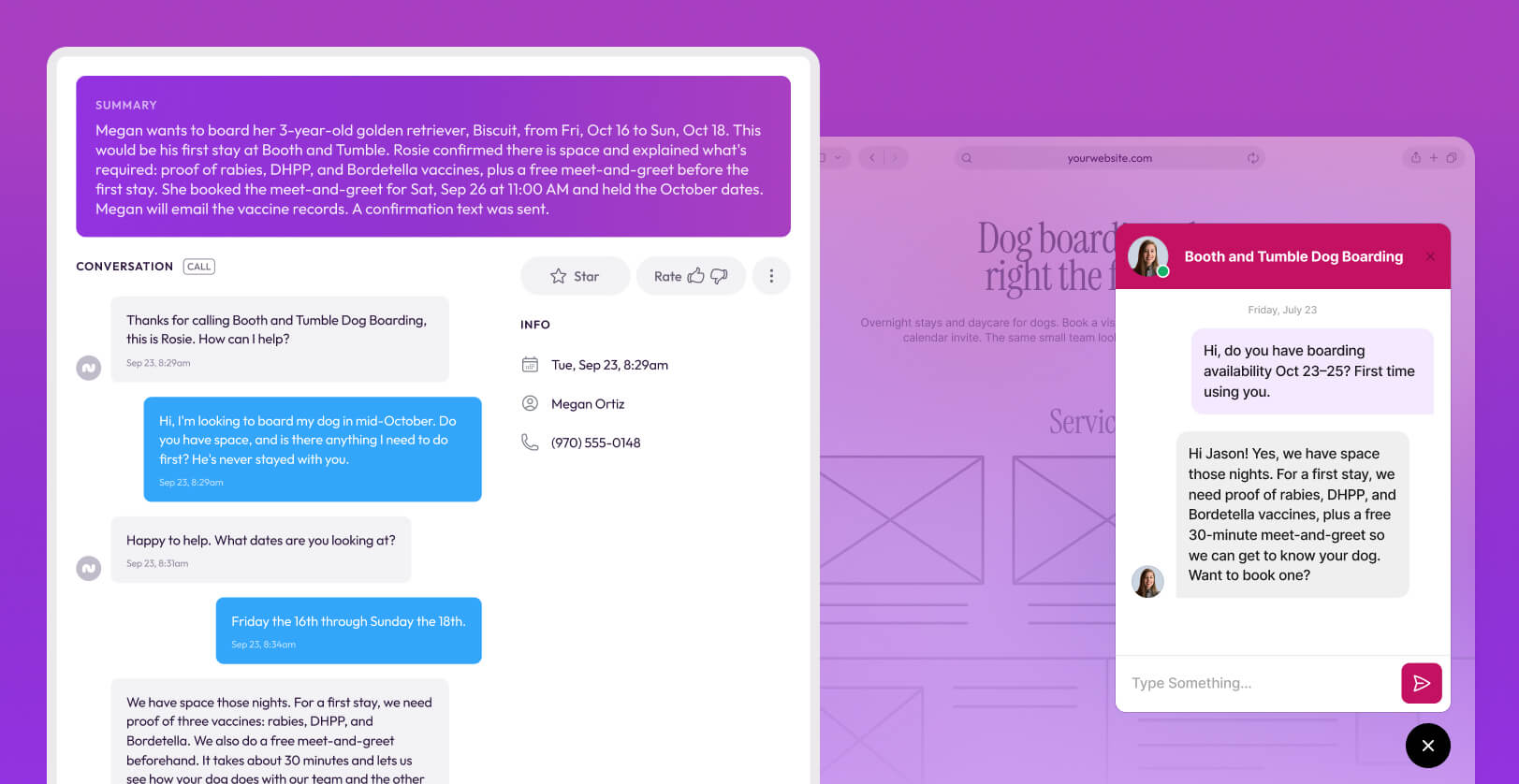
PagersDirect is a good example of what that looks like in a real business:
“We added the Rosie chat feature to our website about 2 months ago. It’s incredible. It utilizes the same information provided for Rosie’s Virtual Receptionist and she can handle multiple simultaneous chats and phone calls 24 hours a day.” — Jack, PagersDirect
PagersDirect also uses Rosie with its Shopify store. Rosie can look up order information, provide tracking and order status, add call notes to an order, and send the customer a relevant product link during the phone call.
Goodcall helps you automate calls but Rosie helps you run the customer-facing front office across the places your customers actually use.
Why Goodcall’s “unlimited minutes” doesn’t mean unlimited customer conversations
Goodcall offers unlimited minutes and AI tokens on every paid plan.
That sounds great and for some businesses, it genuinely is.
Goodcall does not charge based on how long somebody stays on the phone or how many times the same person calls during the month. Instead, it charges based on the number of unique customers who interact with the agent.
A unique customer is a caller using a unique phone number who actually speaks to the Goodcall agent. If the same customer calls ten times from the same number, they only count once that month. Robocalls, blocked callers, and people who hang up without saying anything do not count.
That can be a very good pricing model if your business has long conversations with a small group of repeat customers.
But unlimited minutes are not unlimited customers.
Goodcall’s Starter plan costs $79 per month, per agent, and includes 100 unique customers. Growth costs $129 per agent for 250 unique customers. Scale costs $249 per agent for 500 unique customers.
Once you pass the allowance on your plan, each additional unique customer costs $0.50.

Here are a few examples of what that looks like in practice:
100 unique customers: $79 per month on Starter.
300 unique customers: $154 per month on Growth — the $129 plan plus $25 for 50 additional customers.
700 unique customers: $349 per month on Scale — the $249 plan plus $100 for 200 additional customers.
But practically speaking, even 100 unique callers is just 3 calls a day.
Imagine a home-service business in a busy season. It’s not out of the question for a business like that to get 100 different callers without being a large company. So can a local law firm running ads, or a hair salon with a strong Google presence.
Those are good outcomes because every small business owner wants more new people to discover the business and get in touch.
But with Goodcall, every new phone number moves you closer to the limit. More first-time customers mean a higher bill, even though the minutes themselves are described as unlimited.
The pricing is also per agent. If a business needs separate agents for multiple locations or different phone operations, it needs to include those additional subscriptions in the comparison as well.
Rosie uses a more familiar minute-based model:
Professional is $49 per month for 250 minutes.
Scale is $149 per month for 1,000 minutes.
Growth is $299 per month for 2,000 minutes.
And while calls and unique customers are not directly comparable, Goodcall may be the better deal for a business with a small number of repeat customers who have long conversations.
But Rosie’s model is more naturally aligned with the business that wants a steady flow of new leads and customer inquiries.
Website Chat is also included on every plan, so those conversations do not create a second customer limit or require another chat subscription.
Rosie’s Shopify app is a unique differentiator
If your business has an e-commerce arm that sells products online through Shopify, the comparison goes beyond minutes and customer counts.
Rosie’s Shopify app can help her look up an order, share tracking or status information, add a recap of the phone conversation to the order, and send the customer an appropriate product link while they are still on the call.
That is what front-office coverage looks like in practice.
Rosie is not simply reducing the number of calls somebody has to answer. She is resolving common questions and helping customers take the next step.
How Goodcall and Rosie handle routing differently
Goodcall gives you a lot of control over how its phone agent behaves.
You can create skills for common requests, forms to collect information, and branching logic that sends the caller down different paths based on their answers. You can build yes-or-no questions, multiple-choice routes, fallback options, and an operator workflow for questions the AI cannot handle.
For example, a lawn-care business could ask what kind of service the caller needs. A mowing request could go to scheduling. A landscaping inquiry could trigger a lead form. A returning maintenance customer could receive a booking link by text.
That is useful. Especially if you are an operations-minded owner who likes mapping out every decision point.
But you need to build and maintain those flows.
Starter includes one logic flow. Growth includes three. Scale includes 25.
A business may want separate paths for new leads, existing customers, quotes, service issues, appointment changes, after-hours calls, and different departments. If those workflows need their own logic, the business may need a higher plan—and someone still has to decide how every branch should work, test it, and refine it.
Rosie is excellent at routing but handles it in a different way. She approaches the job more like a trained front office manager than a phone-tree project.
Rosie first works out why the person is calling.
If she can answer the question, send the right link, book the appointment, or take the necessary details, she does that without interrupting the team.
A caller asking for business hours should not be transferred to the owner. Neither should somebody who just needs the booking page.
Smart Message Taking lets you set different information-collection scenarios for different types of calls.
A quote request might need the customer’s location, the kind of work they need, and the best time to contact them.
A service problem might need an account number and a description of what has gone wrong. An urgent inquiry may need a completely different set of questions.
Rosie collects that information before the handoff.
That means your team does not just receive a ringing phone. They know who is calling, why they are calling, and what Rosie has already learned.
There are a few different ways Rosie handles the transfer itself:
Cold transfers connect the caller immediately when that is the right next step — Rosie can use your transfer schedule and only bring in a person when the call genuinely needs one.
Warm transfers give your team the context before Rosie connects the caller — The person picking up knows what the customer needs before saying hello.
Waterfall transfers try multiple people in the order you choose — If the first person does not answer, Rosie moves to the next number instead of dropping an important customer back into voicemail.
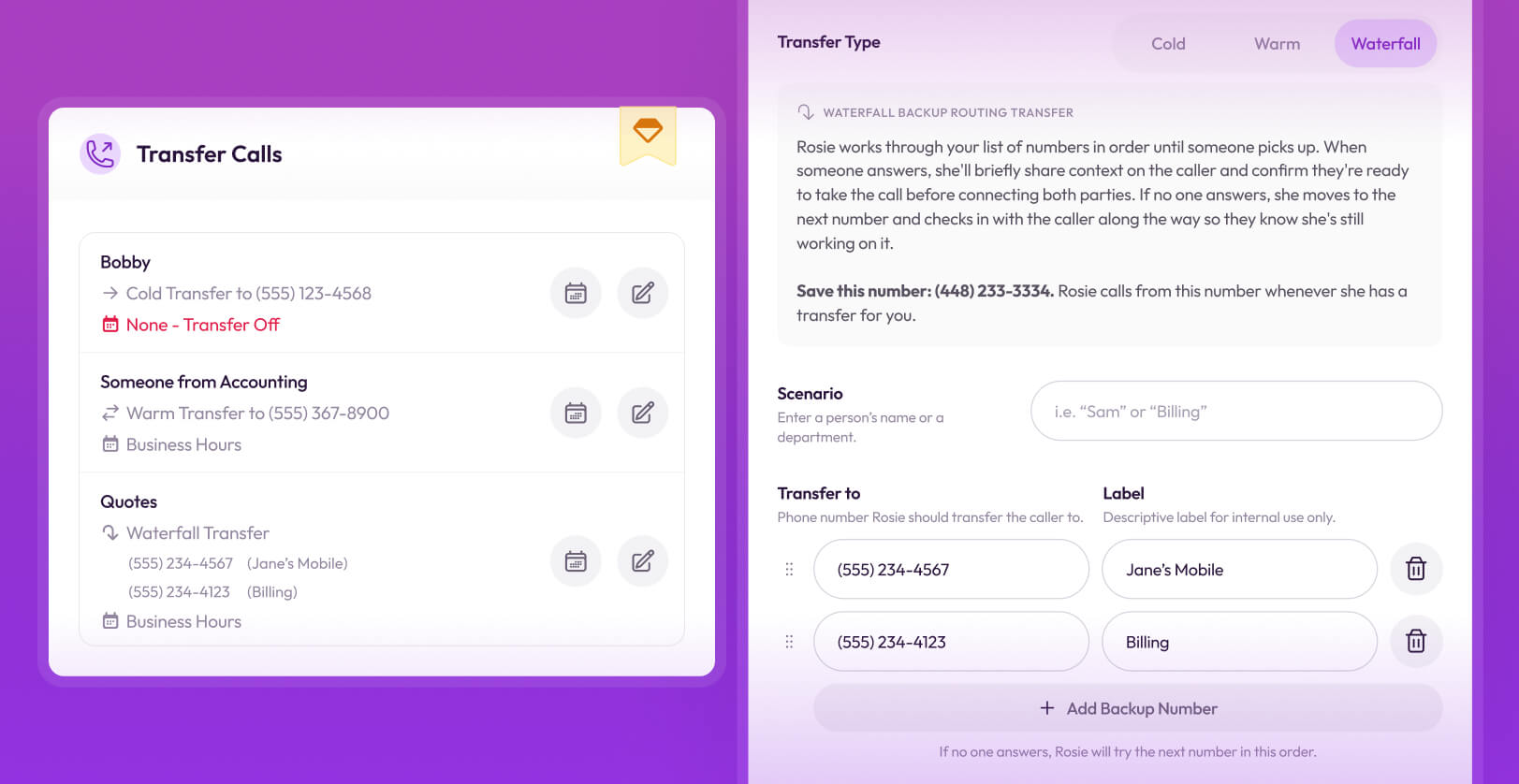
Rosie also screens spam and sales calls, handles routine questions first, and can send useful information during the call.
Goodcall gives you the tools to design a phone workflow. Rosie gives you a trained front office that works out what needs to happen, collects the right information, and brings in your team with context when required.
Where Goodcall might be a better fit
Goodcall is a capable phone agent.
If that is exactly what you want, it can be a good choice.
An operations-minded buyer may prefer having detailed control over skills, forms, branching logic, routing rules, and fallback actions. If someone on the team wants to own that decision tree and keep improving it, Goodcall gives them useful no-code tools to do it.
Its unique-customer pricing can also work well for a business with a small group of repeat callers and long conversations.
Imagine a company with 80 regular customers who call several times each month and sometimes stay on the line for a while. Goodcall may count those callers as only 80 unique customers, regardless of how many calls they make or how long those calls last. In that case, unlimited minutes are genuinely valuable.
Goodcall may also suit an enterprise voice-AI project that already has its own website chat, messaging channels, CRM, and customer-service stack. That buyer may not need Goodcall to be the whole front office. It may only need a configurable phone agent that can feed call data into existing systems.
Goodcall publicly markets enterprise security, custom API integrations, service-level agreements, priority support, and custom onboarding for those kinds of businesses (they're usually call centers.)
But those are fairly specific use cases.
Most small business owners are simply trying to stop losing customers and opportunities while they are busy doing the work.
And the calls are only part of that problem.
If the business also gets website questions, text conversations, Facebook messages, Instagram DMs, booking requests, and repeat customer inquiries, Goodcall still leaves the owner looking for other tools and processes.
Rosie is the better fit when the goal is to cover those customer conversations in one place, using the same business information, without adding another employee or piecing together a front-office stack.
Conclusion
Goodcall is a capable phone agent. Rosie is a complete AI front office.
Goodcall gives you unlimited call minutes, configurable skills and forms, branching logic, and a pricing model that can work especially well when the same customers call repeatedly.
But it is still focused on the phone.
Even before you consider per-agent pricing and unique-customer limits, a Goodcall customer still needs other products or processes for Website Chat, Website Texting, and conversations from other Lead Sources.
Rosie is built around the way customers actually contact a small business now.
She handles calls and website visitors using the same business knowledge. She can capture and qualify leads, book appointments, send information by text, route calls with context, try backup numbers when the first person does not answer, and bring messages from connected Lead Sources into the same front-office workflow.
Choose Goodcall only when you deliberately need a configurable phone agent for a defined voice workflow.
Choose Rosie when you need one AI front office that handles your customers wherever they contact you.