Your phone rings while you’re with a customer. You let it go to voicemail because you’re on a ladder, under a sink, in a treatment room, or in the middle of a client consult. Ten minutes later, another call comes in. Then a text. Then your front desk asks about tomorrow’s schedule. By noon, you’ve done plenty of work, but half your day has gone to interruptions, callbacks, rescheduling, and hunting for information you already answered last week.
That’s what inefficiency looks like in a local service business. It rarely shows up as one dramatic failure. It shows up as constant friction. A missed call that should have become a booking. An invoice sent late because the day got away from you. A team member doing the same task three different ways. A business owner who stays late to “catch up” and never really does.
Improving business efficiency isn’t about turning your shop into a corporate process lab. It’s about getting control of the repeatable parts of the day so you can protect the work that makes money.
Table of Contents
The Hidden Costs of Inefficiency for Small Businesses
The obvious cost of inefficiency is wasted time. The hidden cost is what that wasted time crowds out.
Take a typical local business. A plumber is trying to finish two jobs before lunch. A salon owner is bouncing between clients, walk-ins, and supplier calls. A small law office is answering intake questions while also chasing documents and court dates. Nobody feels idle. In fact, everybody feels slammed. But being busy and being efficient are not the same thing.
Damage shows up in four places.
Lost leads and delayed follow-up
A missed call isn’t just a missed conversation. It’s often a customer who called the next business on the list. Local buyers usually need help now, not next Tuesday when someone finally gets around to calling back.
When the owner or front desk has to manually field every inquiry, the business starts dropping opportunities during the busiest parts of the day. That hurts growth long before it shows up in a report.
Practical rule: If new inquiries depend on one busy person being available at the right moment, you don’t have a lead process. You have a bottleneck.
Customer frustration
Customers don’t care that the shop is short-staffed, the truck is running late, or the office phone has been ringing all morning. They care that nobody answered, nobody followed up, or three people gave them three different answers.
For service businesses, inconsistency creates extra work. You answer the same question again. You smooth over confusion. You fix scheduling mistakes. You issue credits or apologies. That’s all rework.
Owner burnout
This is the part many owners understate. Inefficiency is exhausting because it forces constant context switching. You’re estimating one job, answering another customer, checking a voicemail, resending an invoice, and replying to a team member who couldn’t find the right form.
That kind of day drains good judgment. It also keeps important work from getting done, like training staff, improving pricing, or building referral partnerships.
Stalled growth
A business can stay profitable for a while with messy operations. It usually can’t scale that way.
Industry guidance on modern business efficiency keeps coming back to the same basics: identify bottlenecks, remove redundant steps, and track efficiency metrics continuously so gains last over time, rather than relying on ad hoc fixes, as noted in this business efficiency guide from Dynamics Consultants. That advice applies just as much to a local contractor or spa as it does to a larger company.
If your growth plan depends on you personally catching every call, approving every detail, and remembering every next step, the business has hit a ceiling.
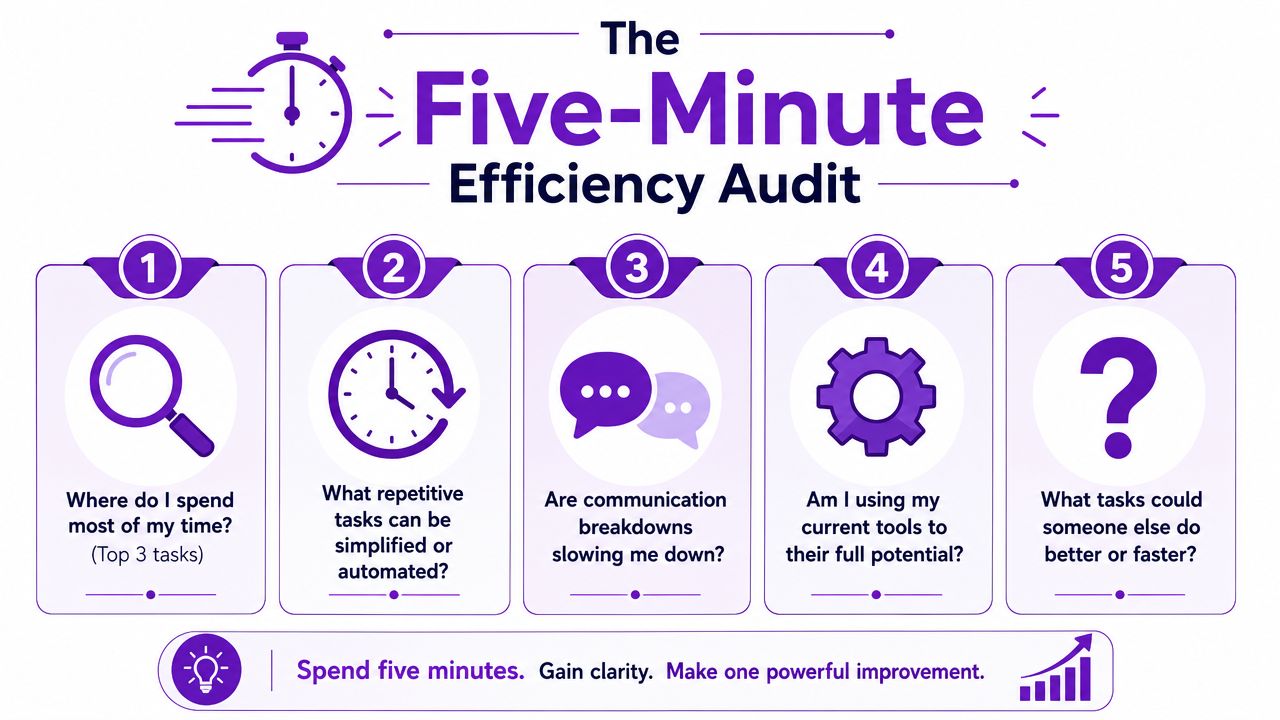
Your First Step The Five-Minute Efficiency Audit
Most owners don’t need a consultant to tell them something feels off. They need a fast way to pinpoint where the drag is.
A proper improvement effort starts with AS-IS process mapping and baseline measures for quality, timeliness, and customer satisfaction, because you can’t improve a process until you’ve identified the bottlenecks in the current one, according to CPS HR’s process improvement guidance. For a small business, that doesn’t have to mean a giant whiteboard session. It can start with a blunt five-minute audit.
Start with where work gets stuck
Ask yourself these questions in plain language, not management jargon:
Where do customer inquiries pile up? Are calls going to voicemail? Are web leads sitting in email? Are texts spread across multiple phones?
What task gets delayed even though it matters? Invoicing, estimates, appointment confirmations, and lead follow-up are common culprits.
What do customers ask over and over? Hours, service area, pricing basics, availability, insurance, and next steps.
Where do handoffs break down? Office to field, stylist to front desk, attorney to intake, estimator to scheduler.
Which task annoys everyone because it’s repetitive? That’s usually a strong automation candidate.
Don’t overthink this. You’re trying to catch friction in the act.
Look for the work you keep doing twice
A lot of inefficiency hides inside repetition. Not healthy repetition, like a standard process. Wasteful repetition.
That usually looks like this:
Re-entering information: Someone writes down a caller’s details, then types them into another system later.
Answering the same FAQ manually: Your staff explains hours, pricing ranges, location, or booking steps all day long.
Fixing preventable mistakes: Wrong appointment times, incomplete intake details, unclear notes.
Chasing internal updates: Team members ask each other for information that should already be documented.
Following up late: A lead comes in, but no one responds until the job site quiets down.
If you hear “I thought someone else handled that,” you’ve found an efficiency problem.
This is also the moment to pay attention to non-billable phone time. Service businesses lose a surprising amount of productive time to spam, sales calls, routine status checks, and callers who need simple answers but still pull a technician or owner away from real work.
Turn the audit into a short hit list
Don’t create a giant improvement project. Build a short list of three pain points that meet two tests:
They happen often
They interrupt revenue-producing work
For most local businesses, the first-round list usually includes some version of the following:
Phone handling
Missed calls
After-hours inquiries
Repetitive questions
Spam and robocalls
Scheduling
Back-and-forth appointment setting
No centralized calendar
Last-minute confusion
Lead follow-up
Slow response times
No standard intake notes
Leads buried in voicemail or text threads
Admin
Invoices sent late
Estimates waiting on approval
Notes stored in too many places
Team communication
No shared process for new leads
Different staff members handling the same issue differently
Constant interruptions for status updates
A simple way to do this is to write down one line for each issue:
Problem | Where it happens | Who it affects | What it costs you |
|---|---|---|---|
Missed calls | During jobs and after hours | Owner, front desk, new leads | Lost opportunities and callback backlog |
Scheduling confusion | Text, phone, calendar | Staff and customers | Double work and avoidable mix-ups |
Slow invoice follow-up | End of day | Office, owner | Delayed cash collection |
That’s enough to move from vague frustration to action.
Reclaim Your Day with Smart Automation
It’s 10:30 a.m. One tech is on a ladder, the office line is ringing, two voicemails came in after hours, and a new lead is waiting because nobody had time to call back. That is what inefficiency looks like in a local service business. It rarely shows up as one big failure. It shows up as interruptions, delays, and admin work that keeps pushing revenue-producing work to the side.
Automation helps when the task is repeated, predictable, and expensive to handle by hand. For most service businesses, that means the front office first. Calls, scheduling, reminders, intake, and routine follow-up usually create a faster payoff than trying to automate complicated back-office workflows too early.

Manual handling versus automated handling
Owners often treat phone problems as part of the job. They are not. They are a workflow problem.
Manual phone handling | Automated phone handling |
|---|---|
Calls ring while you’re working | Calls are answered even when your team is busy |
Missed calls become callbacks later | Basic questions get answered right away |
Spam still interrupts the day | junk calls can be screened before they hit staff |
Intake details depend on whoever answered | messages and summaries stay consistent |
After-hours callers wait | inquiries can be captured around the clock |
For many local businesses, the phone is the first bottleneck worth fixing because it interrupts everyone. A plumber in the field, a med spa owner with a client in the room, or a contractor driving between jobs all face the same trade-off. Stop what you are doing to answer, or risk losing the call.
A practical fix is an AI answering layer for first-response coverage. Rosie is built for that specific problem. It answers calls during the day and after hours, handles common questions based on your business information, captures lead details, books appointments or passes along urgent calls, and screens spam so your staff deals with fewer low-value interruptions. If you’re mapping out where that fits, this guide on how to automate your business shows the right starting points.
Where automation pays off first
The best early automations usually remove repeat decisions and repeated interruptions.
Start with work like this:
Call answering and routing: Handle common questions, take clean messages, and send urgent calls to the right person.
Appointment scheduling: Let customers book without three rounds of phone tag.
Confirmation and reminder messages: Cut down on manual follow-up and no-show risk.
Template-based replies: Give staff a standard response for common service questions.
Centralized lead capture: Keep inquiries out of personal inboxes, voicemail chains, and scattered notes.
If you’re evaluating broader approaches to implementing AI support, use a simple filter. Pick tasks your team repeats every day, where the right response is usually known, and where slow follow-up costs you work.
Good automation protects your team’s time so they can focus on jobs, customers, and exceptions that need a person.
There is a trade-off, though. Every new tool promises savings, but disconnected tools create a different problem. More tabs. More logins. More places where information gets lost. For a small business, smart automation should cut handoffs and reduce noise, not add another system someone has to babysit.
Empower Your Team with Simple Processes
Technology helps. Process keeps the gains from falling apart.
A lot of owners resist documenting anything because “every job is different.” That’s true for the work itself. It’s usually not true for the repeatable parts around the work. New lead intake, appointment confirmation, client onboarding, payment follow-up, complaint handling, and job closeout all benefit from a standard approach.
Build one-page playbooks
Forget the phrase SOP if it makes your eyes glaze over. Call it a playbook.
A good playbook for a small business fits on one page and answers five questions:
What starts this task?
Who owns it first?
What are the exact steps?
What must be recorded?
When does it count as done?
For example, a “new lead handling” playbook might include:
Trigger: Phone call, web form, text, or walk-in
Owner: Front desk or office admin
Required details: Name, service needed, location, urgency, preferred callback method
Next action: Book estimate, send intake form, or flag urgent issue
Done when: Appointment is set or the lead is assigned for follow-up
That kind of clarity saves time because people stop guessing.
Train for consistency, not perfection
The most defensible continuous-improvement approach is a closed-loop method like DMAIC or PDCA, where teams define the problem, measure current performance, analyze root causes, improve the process, and keep it under control with regular review. Guidance on process optimization also warns that technically sound changes often fail because employees aren’t prepared, which is why stakeholder alignment, training, and process champions matter so much, as explained in KYP.ai’s business process optimization article.
That applies directly to small teams.
If you change intake, scheduling, or handoff procedures, don’t just announce the change and hope people absorb it. Walk through it. Role-play it. Check real examples from the previous week.
A practical team rollout looks like this:
Show the old way and the new way
Explain why the change matters
Name one person who owns adoption
Review mistakes without blame
Adjust the process if actual conditions expose a gap
That “process champion” can be the office manager, lead receptionist, shop foreman, or whoever others already look to when things get messy.
One more thing: don’t optimize only for speed. Faster intake is useless if details are incomplete. Faster scheduling is useless if the wrong expectations get set. If you want a useful primer on how front-line call handling fits into process design, this explainer on what is a virtual receptionist is worth reading.
A simple process beats a heroic employee every time, because the process still works on the employee’s worst day.
Measuring What Matters KPIs for Service Businesses
Monday starts with a full schedule. By Thursday, the office feels behind, two new leads never got a callback, and everyone has a different opinion about why. That is why service businesses need a short scoreboard. Without one, you are managing by memory and volume.
The goal is simple: confirm whether the business is handling work with fewer delays, fewer dropped handoffs, and less admin drag.
Pick a small scoreboard
For most local service businesses, 3 to 5 KPIs is enough. Any more than that, and the numbers stop helping because nobody reviews them consistently.
Choose measures your team can affect this week, not broad business outcomes that only show up at month-end. Good efficiency KPIs usually sit close to the work itself. They show where calls get missed, where scheduling stalls, and where staff time disappears into repeat tasks. If phone coverage is part of the problem, track it directly. The real cost of missed calls for plumbers lays out why missed inbound calls drain revenue in service businesses.
Useful KPIs include:
Leads captured versus missed
Average response time to new inquiries
Appointments booked without manual back-and-forth
Admin time spent per day
Jobs delayed because of missing information
Customer complaints tied to communication issues
Skip vanity metrics. Social engagement, top-line traffic, and oversized dashboards do not help a shop owner decide what to fix on Friday morning.
Example KPIs for Local Service Businesses
Business Type | Primary Efficiency KPI | Secondary KPI |
|---|---|---|
HVAC company | Leads captured versus missed calls | Average response time to new inquiries |
Plumbing business | Jobs booked from inbound calls | Time spent on phone admin each day |
Salon or spa | Appointment fill rate from inquiries | Rebooking handled without staff intervention |
Law firm | Intake completion rate | Time from first inquiry to consultation scheduled |
Property management office | Tenant issue response time | Repetitive call volume on common questions |
Cleaning company | Quote turnaround time | Missed inquiries after business hours |
Consistency matters more than sophistication. A handwritten weekly tally that gets reviewed beats a polished dashboard nobody opens.
What good KPI tracking looks like
Keep tracking simple enough that it survives a busy week.
A spreadsheet is fine. Your CRM is fine. A whiteboard in the back office is fine. The tool matters less than the habit. I usually tell owners to review the same numbers at the same time each week and ask only three questions: What slipped? Why did it slip? What change do we test next?
A practical review rhythm looks like this:
Every day: Log missed leads, response lag, and obvious breakdowns
Every week: Review core KPIs with the person who owns scheduling or intake
Every month: Look for repeated patterns, not one-off bad days
Every quarter: Decide whether the fix is automation, training, staffing, or a process change
Use KPIs to find friction, not to blame people. If response times jump every time the front desk gets busy, the problem is capacity or process design. It may be time to use call handling tools like Rosie, tighten intake steps, or remove work that still depends on someone remembering to follow up manually. If you want an outside reference point, this guide on strategies for operational efficiency is a useful companion to a weekly KPI review.
Track the few numbers that show where time and revenue leak out. Ignore the rest.
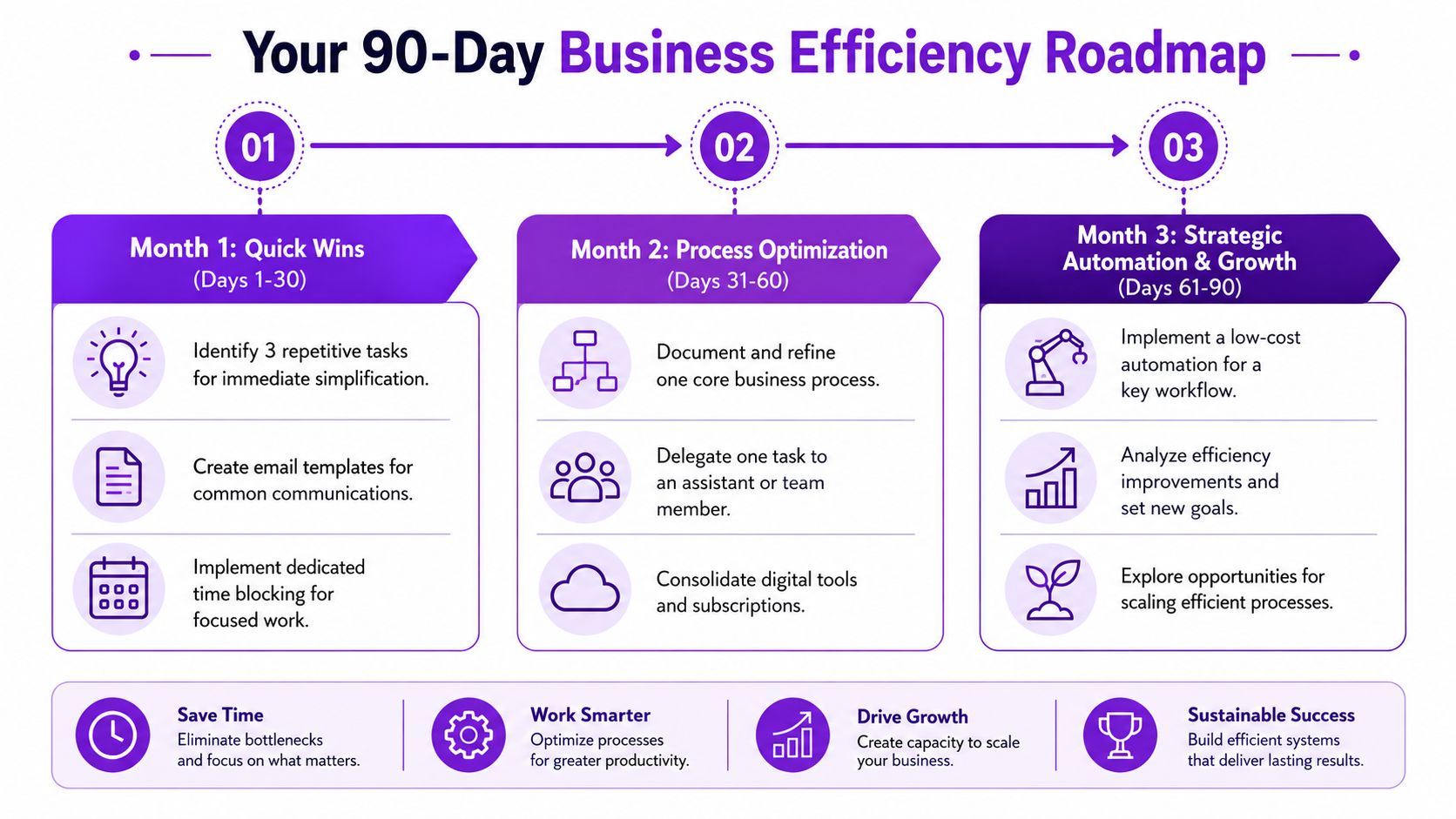
Your 90-Day Business Efficiency Roadmap
Most businesses don’t need a total overhaul. They need a sequence.
Trying to fix everything at once creates more chaos. A 90-day window is long enough to make operational changes and short enough to keep momentum. If you want another outside perspective on practical strategies for operational efficiency, that resource is useful alongside the plan below.
Days 1 to 30 quick wins
The first month is about stopping the obvious waste.
Start by finishing the five-minute audit and choosing three problem areas. Focus on interruptions and repetitive work first. That usually means calls, scheduling, and basic customer communication.
Then tighten up a few immediate habits:
Protect focused work blocks: Stop letting the phone or inbox dictate every hour.
Create standard replies: Build email or text templates for common questions.
Centralize incoming inquiries: Keep calls, messages, and lead details in one place.
Cut repeat explanations: Put your most common customer answers in one documented source.
If your phone is the daily choke point, fix that early. It has ripple effects across lead capture, customer experience, and owner stress.
Days 31 to 60 process cleanup
Month two is where you turn improvisation into process.
Pick two or three core workflows and document them. Good candidates include new lead handling, scheduling, and payment follow-up. Keep them short. Train staff using real examples from your business, not abstract instructions.
This is also the right time to reduce tool sprawl.
Drop duplicate systems: If two tools do the same job, choose one.
Assign ownership: Every recurring process needs a name next to it.
Review handoffs: Office to field, intake to service, provider to billing.
Fix recurring confusion: If people keep asking the same internal question, the process isn’t clear enough.
Days 61 to 90 review and adjust
The third month is where efficiency becomes a management habit instead of a one-time cleanup.
Review your KPI trend line. Look at where calls are still being missed, where response time slips, and where staff still rely on memory. Then decide whether the fix is more training, a tighter process, or another automation.
This month is also for pruning. Some changes won’t stick. That’s normal. Remove the ones that add complexity and keep the ones that reduce effort without lowering service quality.
By the end of 90 days, the business should feel calmer in very specific ways. Fewer calls fall through the cracks. Staff follow the same path for common tasks. Customers get answers faster. You spend less time patching holes and more time running the business on purpose.
If missed calls, repetitive questions, and constant interruptions are eating your day, Rosie gives local service businesses a practical way to keep every inquiry covered without adding more manual phone work. It’s a straightforward first move when you want better efficiency without a major overhaul.