You’re halfway up a ladder, drill on your belt, and your phone starts buzzing in your pocket.
You can’t answer safely. You shouldn’t answer safely. By the time you get down, finish the task, and call back, the prospect has already moved on to the next contractor who picked up first. That’s how good companies lose good jobs. Not because their work is bad, but because no one was available when the lead came in.
A modern answering service for contractors fixes that by doing more than taking a message. It answers, qualifies, books, and routes calls while you stay focused on the work.
You’ll see:
Why missed calls turn into lost jobs faster than most contractors realize
Which features are essential for plumbing, HVAC, electrical, roofing, and general trades
How a modern setup can plug into your schedule and call workflow without adding office overhead
If you’re ready to stop sending leads to voicemail, you can create a Rosie account and see how an always-on front desk fits your business.
Table of Contents
Why every missed call is a lost job, not just a lost call
The real cost isn’t the ring
For contractors, missed calls usually happen for a simple reason. You’re working.
You’re in an attic, under a sink, on a roof, driving between jobs, meeting an inspector, or talking to a crew member who needs an answer right now. Nobody in the field can also be a full-time receptionist.
That’s why this problem hits the trades so hard. Home services and construction businesses miss roughly 27% of inbound calls, and 85% of those callers do not call back, according to Goodcall’s construction answering service overview. When that caller moves on, the loss isn’t theoretical. The same source notes a missed call can mean thousands of dollars in lost revenue.
That should change how you look at your phone setup.
A voicemail box is not a backup plan. It’s a leak in your sales process.
If you’re already spending on trucks, payroll, fuel, and local SEO and lead conversion, it makes no sense to let an inbound lead die because nobody answered on the first try.
Practical rule: If you paid to generate the call, you need a system that catches it live.
This gets worse during busy stretches. The more work you win, the less available you are to answer the next call. That creates a ceiling on growth.
What contractors say when this keeps happening
The contractors who feel this most are usually the ones wearing three hats at once. Owner, estimator, and field lead.
Jason Aleman of Gutter Cowboy put it plainly: “It’s almost every day that I lost a job due to not answering the phone. Rosie can take all of those calls and handle them appropriately.”
Francisco Fierro of Iron Volt Electric said: “Before Rosie, missed calls meant missed jobs. When the crew is out in the field all day, no one can stop to answer the phone… Now I don’t have to stress about missed calls. Rosie picks up automatically so every caller gets a response even when we’re tied up on a job.”
That’s the day-to-day reality. Not bad service. Not lazy follow-up. Just no capacity in the moment.
If you want a useful gut check, look at your own call abandonment rate. It’ll tell you how often callers give up before a real conversation even starts.
What a modern answering service actually does for contractors
Old answering services took messages
A lot of contractors still picture an answering service as a script reader who says, “I’ll let the office know.”
That model is too passive for the trades.
If a caller wants a quote, asks whether you service their area, needs after-hours help, or wants to know if you handle a specific repair, a message-taking service slows everything down. You still have to call back, figure out what they want, and hope they haven’t booked with someone else.
That’s not much better than voicemail.
Modern systems move the job forward
Modern platforms work as a workflow integration layer, not just a call-taking tool. They can capture lead details, answer common questions, and sync messages to CRM and scheduling systems in real time, as described in Whippy’s guide to contractor answering services.
In plain English, that means the system should do work for you while the caller is still on the line.
Here’s what that looks like in practice:
Lead qualification: It asks what service the caller needs, where the job is, and whether the request fits your business.
Basic question handling: It answers common questions using your business info, FAQs, service details, hours, and policies.
Appointment booking: It sends the caller into a real scheduling path instead of adding another callback to your evening.
Call transfer: It routes priority calls to the right person when the issue needs immediate attention.
Workflow updates: It pushes notes into the systems your team already uses.
If you want to understand the bigger shift, this is the same trend behind tools that automate lead qualification. The goal isn’t just to “answer.” The goal is to move a prospect closer to becoming a customer.
That’s the difference between a cost and an operational tool.
One option in this category is Rosie. It scans your website or Google Business Profile, uses your business knowledge to answer questions, qualifies leads, books appointments, transfers calls, and can send summaries, transcripts, and recordings to your team. That’s much closer to a front desk than a voicemail substitute. If you want a broader view of that model, read how an AI answering service can transform your home services business.
Derek Goodson, Founder of Next-Level Marketing Agency, described the difference well: “She doesn’t just take a name and number, she asks the right questions about what services they need… By the time I call them back, I already know exactly what they’re looking for and can jump straight into offering solutions instead of spending 10 minutes on discovery.”
A good answering system shouldn’t create more admin. It should remove it.
The must-have features in a service built for the trades

Twenty four seven coverage that helps
A contractor misses calls for predictable reasons. Crews are on ladders, in crawl spaces, driving between jobs, or wrapping up paperwork after hours. The service has to cover those gaps without turning every inbound call into a callback list for the next morning.
Good coverage means the caller gets a useful outcome right away. A new prospect can be screened. A repeat customer can get routed based on the problem. A service request can be booked or pushed into your process with the details your team needs. If the provider’s answer to after-hours demand is still “we’ll pass along the message,” it is using an old receptionist model for a job that now needs qualification, routing, and workflow follow-through.
Ask one practical question during a demo: what does the system do with a new estimate request that comes in at 6:15 PM? The best services do more than pick up. They capture job type, location, urgency, and next step so your office is not rebuilding the conversation later.
Emergency triage with clear rules
Triage is where trade-specific phone coverage either protects revenue or creates headaches.
According to Voiceflow’s contractor answering service breakdown, contractor call handling works best when urgent issues are identified in real time and handled differently from routine inquiries. That only works if the rules are clear before the first emergency call hits.
For most shops, calls fall into three buckets:
Immediate risk or active damage: water leaks, electrical hazards, gas concerns, lockouts involving safety issues, or anything causing property damage right now
Urgent service need: no cooling, no heat, failed water heater, broken opener, or equipment down that needs same-day scheduling
Routine demand: estimates, standard service questions, billing questions, reschedules, and general office matters
The trade-off is simple. If your rules are too loose, your on-call tech gets hammered with calls that could wait until morning. If the rules are too tight, you leave real money and real customer problems sitting in a queue. A good AI answering service earns its keep here because it follows the playbook every time, asks the same screening questions, and logs what happened for the office and field team.
Field note: If a provider cannot show you its escalation logic in plain language, do not trust it with emergency traffic.
Scheduling, transcripts, and spam control
Once the call is classified, the next job is reducing office drag.
A service built for contractors should plug into the way work already moves through your business. That means booking estimate requests into the right calendar, capturing transcripts and recordings so nobody has to guess what the caller said, and filtering junk calls before they waste a dispatcher’s time. It should also use your service area, trade terms, and policies so the answers sound like your company, not a generic call center script.
Three features matter more than they get credit for.
Scheduling tied to your workflow: estimate requests and service calls should land where your team can act on them
Full call records: transcripts, summaries, and recordings reduce rework and help when a lead changes hands
Spam control and field visibility: junk stays out, while real calls stay visible to the people running jobs
Dean Konstantine of McKnight highlighted the value of documentation: “What we love most is how it captures every call and delivers both a full dialog transcript AND the actual recording straight to us. No more wondering what was said or missing important details. Everything is documented perfectly, every time.”
Edgar Quinteros of The Copier Guy described the field side of it: “Before the app I was stressed out on what spam calls were calling or if I missed any calls during a job. Now I can focus on my customers and don’t have to miss any important calls.”
If you run the business from the truck as much as the office, a mobile app for reviewing calls, messages, and follow-up gives you control without adding another layer of admin.
ROI from capturing every call
What the monthly cost should be measured against
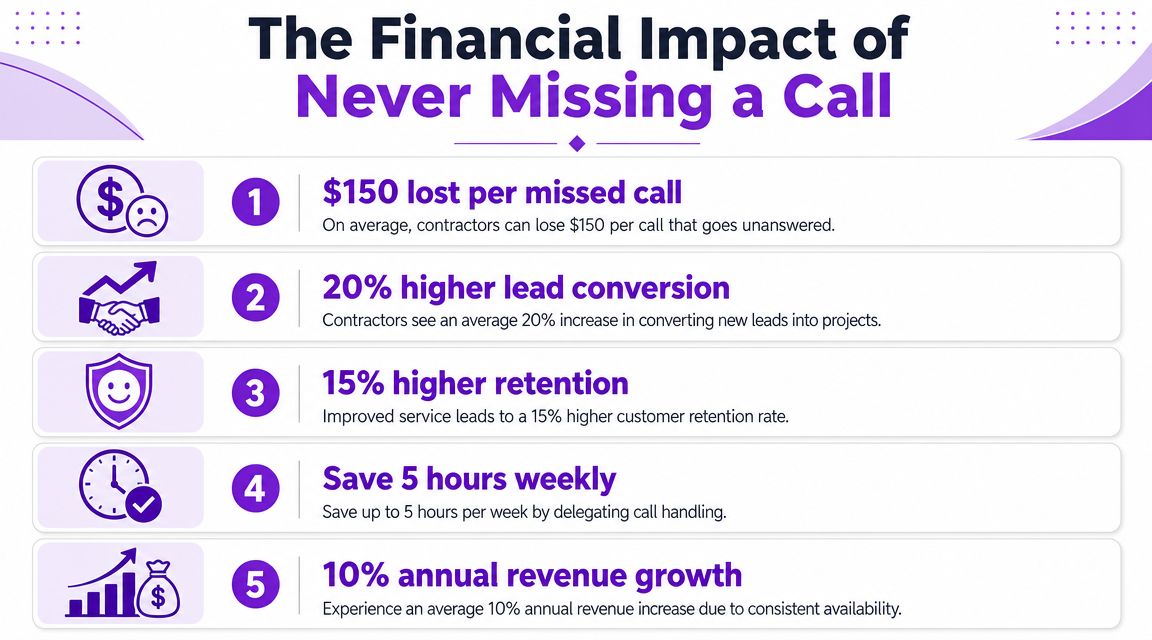
A lead calls while you are on a ladder, under a house, or driving between jobs. It goes to voicemail. They call the next contractor. That is the cost to measure.
Contractors often start with the monthly fee. The better comparison is what one missed call can turn into. A lost estimate. An emergency job that goes to a competitor. A high-value customer who never calls back because the first experience felt slow.
AI answering services can start around $49 per month. Traditional live answering services usually cost more for basic coverage, as noted earlier in the article.
That framing matters because a modern service does more than take a message. It can qualify the caller, collect job details, route urgent work, and push the next step into your workflow. If it helps you save even one solid job each month, the math changes fast.
Option | Typical pricing context | What to weigh |
|---|---|---|
AI answering service | Starts near $49 per month | Lower cost entry point, 24/7 coverage, strong fit for lead qualification, booking, and routing |
Traditional live service | Higher monthly cost for basic plans | Better fit for companies that prefer human-only call handling |
No coverage beyond voicemail | No monthly fee | Missed leads, slower response times, more callback work, and fewer booked jobs |
The returns that matter in the field
There are two returns contractors care about.
First, more booked work. If calls get answered, screened, and moved toward an estimate or appointment, revenue stops leaking out through voicemail.
Second, less drag on the owner and office staff. The phone stops running the day. Your team spends less time chasing half-complete messages and more time closing work that fits your service area, job type, and schedule.
Jason Aleman explained what customers notice: “People tell me all the time, you’re really easy to do business with. I called, I got the link sent to me, the pricing was there, I booked an appointment and you showed up to the job.”
That is not just a service win. It is a sales advantage. Homeowners and property managers often hire the company that responds first and makes the next step easy.
Derek Goodson put the staffing trade-off in plain terms: “Rosie has given me the capacity to scale without hiring, which as a solo operator trying to build sustainable monthly recurring revenue, is exactly what I needed.”
That is where AI earns its keep. It covers the gap between doing nothing and adding another employee. For many contractors, that middle option is the one that protects revenue without adding payroll.
Use three practical checks:
Did it capture leads you would have missed
Did it qualify callers so your team spent time on real opportunities
Did it reduce after-hours callbacks and scheduling cleanup
If the answer is yes, this belongs in your revenue system, not your phone bill.
How to get your answering service running in a day
Step one connect your business info
Setup shouldn’t feel like a software project.
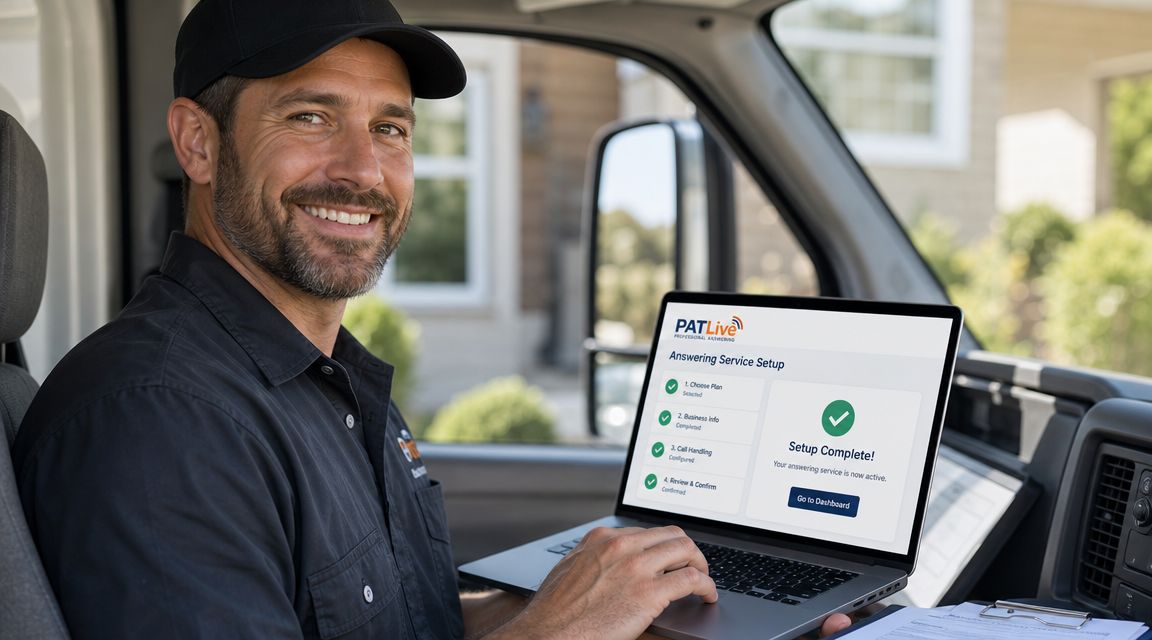
Start by giving the system the basics it needs to answer accurately. That includes your business name, services, service area, hours, common questions, and the kinds of calls you want handled. If the platform supports it, it should scan your website or Google Business Profile so you’re not rebuilding everything from scratch.
Accuracy begins with solid foundations. If your intake knowledge is clean, callers get clear answers.
Step two shape the call flow
Next, decide what should happen for each call type.
A useful setup usually includes:
New lead calls that need qualification and either booking or follow-up
Existing customer calls that need status updates, messages, or routing
Urgent calls that should transfer to an on-call number
Spam or sales calls that should be filtered out
This part matters more than people think. The right call flow keeps you from getting interrupted by junk while still making sure the high-priority calls reach you.
Daniel Terner of Terner Elder Law, P.L. summed up a good product experience this way: “It can’t be easy to develop a product that is both super-configurable yet also easy to use, Rosie strikes this balance extremely well.”
Set the rules once. Let the system handle the repetition.
Step three forward calls and test it
Once the business info and call logic are in place, forward your number and run test calls.
Don’t skip the testing.
Call as a new prospect. Call with an after-hours scenario. Call with an urgent issue. Make sure the answers sound right, the scheduling path works, and the right person gets notified when escalation is needed.
A quick test catches the small things that create big headaches later. Wrong service area. Weak transfer logic. Missing FAQs. Incomplete appointment details.
After that, you’re live.
For a busy contractor, that’s the whole point. You can get coverage in place fast, tighten the responses with a few test calls, and stop relying on luck every time the phone rings.
Is an AI answering service really better than a human
Better than a receptionist isn’t the right comparison
The comparison usually isn’t AI versus a great in-house receptionist.
It’s AI versus missed calls, voicemail, delayed callbacks, and a distracted owner answering between jobs.
When you compare it that way, a strong AI answering setup starts to make a lot more sense. It answers every time, stays on script, doesn’t forget details, and remains available around the clock.
That consistency matters more than people admit.
Edgar Quinteros said: “The response with callers is so real, sometimes customers don’t know it’s AI.”
Daniel Oehl of Snap Fitness went even further: “I have had multiple people call in to test Rosie and they all think she is much better than a real receptionist.”
Where AI is strong and where you still want a human
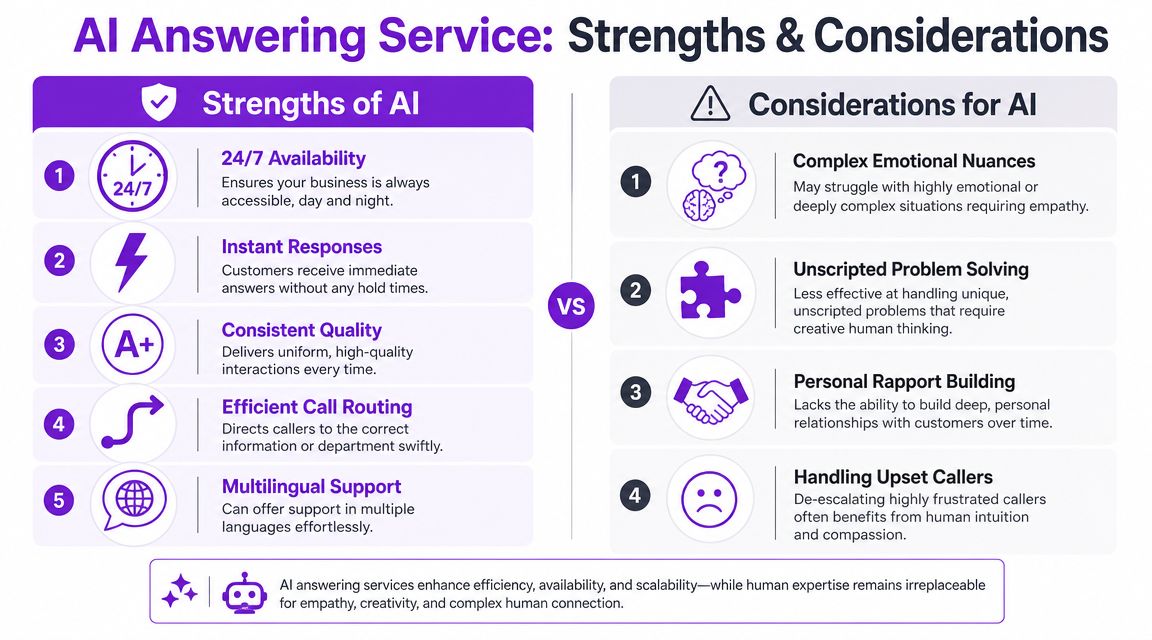
AI is at its best when the work is repetitive, time-sensitive, and rule-based.
That includes answering common questions, collecting lead details, handling scheduling, filtering junk calls, and routing urgent calls based on pre-set logic. For a contractor, that covers a lot of daily traffic.
Ford Wright of Pacific Power Washers pointed to the quality gap between good and bad tools: “We have tried other AI receptionists, but they sounded robotic and worse, misspelled contact info, making it worthless.”
That’s the right caution.
Not all AI systems are good enough for customer-facing calls. If the voice sounds stiff, if contact details come through wrong, or if the handoff logic is weak, it will create more work instead of less.
AI also has limits. Highly emotional callers, unusual edge cases, and complex problems can still benefit from human judgment. That’s not a flaw. It just means you should use AI where it’s strong and route the exceptions properly.
A contractor doesn’t need a machine that pretends to be human in every situation.
You need one that handles the common calls well, captures the facts cleanly, and gets the right calls to the right person.
Stop losing jobs to your voicemail
A homeowner calls during lunch because water is coming through the ceiling. Another calls at 7:12 p.m. after getting your number from a neighbor. If both calls hit voicemail, you are not just missing messages. You are handing high-intent jobs to the next contractor who answers first.
Contractors do not lose work because they lack demand. They lose it because demand shows up while the owner is on a ladder, driving between jobs, or buried in estimates. Phone coverage fixes that only if it does more than collect a name and number.
A modern answering service should qualify the lead, capture the job details clearly, route true emergencies based on your rules, and drop the information into the systems your team already uses. That is the difference between an old-school message service and a revenue tool. One creates a callback list for tonight. The other helps booked work hit the calendar while you are still in the field.
Urgent calls need clear handling, too. A burst pipe, no-heat call, or active electrical issue should follow a different path than a price shopper asking about next month. The service should document what happened, who was notified, and what the caller was told, so your team is not guessing later.
If you are comparing options or looking at the broader shift in how small companies leverage AI for your business, judge it by outcomes. Does it help you respond faster, qualify better jobs, and cut down the admin pile waiting for you after hours?
If the service only takes messages, it is not solving the actual problem.
FAQ
Will my customers be turned off if AI answers the phone
Not if the experience is fast, clear, and useful.
Most callers care about getting help, getting answers, and knowing what happens next. A natural voice, accurate information, and a good booking or transfer path matter a lot more than whether the first response came from AI or a human. The alternative in many contractor shops isn’t a polished receptionist. It’s voicemail.
Can it really book jobs instead of just taking messages
Yes, if you choose a system built for more than message capture.
That’s one of the biggest differences between older answering services and newer AI setups. The stronger systems can qualify the caller, answer common service questions, and move people into an actual appointment workflow instead of creating another callback for you later that night.
How should a contractor answering service handle emergencies
With clear rules, not vague promises.
It should know which calls require immediate routing, which ones can be scheduled, what information must be captured, and who gets notified. It also needs good documentation so your team can review what the caller reported and what action was taken. That reduces confusion and helps your on-call process stay consistent.
Is setup going to eat up my week
It shouldn’t.
A well-designed system should let you load your business details, customize a few call scenarios, forward your number, and test a handful of calls. The setup work is light compared with the time you lose every week to missed calls, callbacks, and interrupted jobs.
If you want your phones covered without hiring a full front desk, Rosie gives contractors 24/7 call handling that can answer questions, qualify leads, book appointments, transfer priority calls, and keep your team updated with summaries, transcripts, and recordings. It’s a practical way to stop losing jobs when you’re busy doing the actual work.