A customer calls during lunch. Your front desk is helping someone in person, your tech is on a job, and the phone rings just long enough to create hope before it drops into a queue, voicemail, or dead air. The caller hangs up. Ten minutes later, they’ve called the next business on Google.
That moment is what call abandonment rate is really about. Not a call-center score. Not a dashboard vanity metric. It’s a count of how many real people tried to reach you and gave up before anyone helped them.
For small businesses, that hurts twice. You lose the immediate lead, and you usually lose it to someone who answered faster. If your days already feel stretched, your phone log can become a quiet list of missed revenue. That’s why this issue belongs in the same conversation as scheduling, staffing, and sales follow-up. If missed calls are a regular problem, this guide on how to stop losing leads to missed calls is a useful companion.
Table of Contents
Why Every Hang-Up Is a Hidden Hole in Your Revenue
A lot of owners treat hang-ups as background noise. The phone log gets reviewed once the day concludes, someone says, “We were slammed,” and everyone moves on. The problem is that callers don’t experience it as background noise. They experience it as friction, delay, and uncertainty.
For a home services company, that abandoned call may have been a leak, no heat, or an electrical issue. For a salon, it may have been someone ready to book for the weekend. For a law firm, it may have been a prospective client deciding whether to call one more office or stop searching. In each case, the caller had intent. Then the business made waiting part of the buying process.
Practical rule: If a caller hangs up before reaching help, treat it like a sales conversation that ended before your team got to speak.
This is why abandonment is a revenue issue first and an operations issue second. Owners often focus on ad spend, reviews, and website conversion while the phone channel leaks demand every day. The frustration is that it feels random when you’re in the middle of work. It isn’t. Most abandonment comes from a handful of fixable conditions: wait time, weak routing, uneven staffing, and poor after-hours coverage.
The businesses that improve this usually stop asking one broad question, “Is our abandonment rate high?” They ask sharper ones instead.
Which calls matter most: New leads, existing customers, billing, scheduling, emergencies.
When callers give up: Lunch rush, first thing in the morning, late afternoon, weekends.
What happens next: Do you call back fast, send a text, or let the opportunity go cold?
That shift matters because not every abandoned call has the same value, and not every one is lost forever. Once you separate high-value calls from lower-stakes ones, your response gets much more practical.
What Is Call Abandonment Rate and How to Calculate It
The simplest way to define it
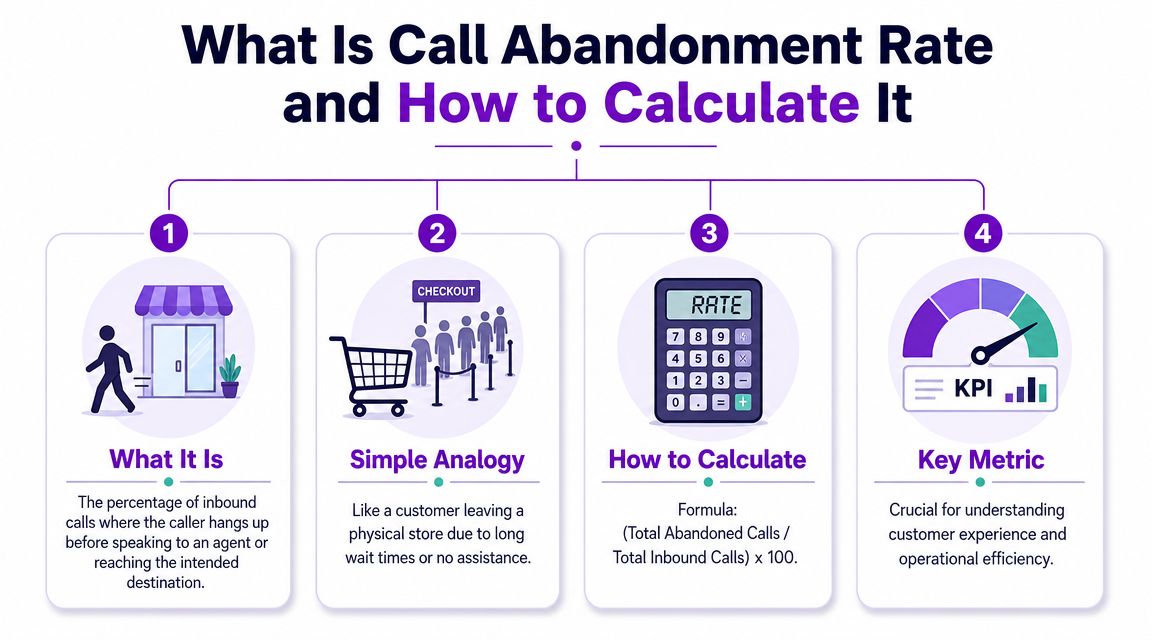
Call abandonment rate is the percentage of inbound calls that disconnect before reaching a live agent. A clear operational example shows how fast this adds up: if 1,500 callers out of 10,000 hang up before speaking to anyone, the abandonment rate is 15%, according to Brightmetrics’ explanation of call abandonment rate and benchmarks. That same source notes that benchmarks often cluster in the 5% to 8% range, with some guidance calling under 5% good performance and broader surveys observing averages in the 12% to 20% range.
A customer walks into your shop, sees a line, waits for help, and leaves before anyone greets them. The person showed buying intent. Your business just didn’t connect in time.
Another way to think about it is a leaky bucket. Inbound calls are the water going in. Every caller who hangs up before reaching help is a leak. If you keep pouring in leads through SEO, ads, referrals, and repeat business but the phone process leaks, you’ll feel busy without seeing the full revenue you should.
A quick calculation example
The basic formula is simple:
Abandoned calls ÷ total inbound calls x 100
If your office received inbound calls during the week and some callers hung up before reaching a person, you divide the abandoned calls by total inbound calls and multiply by 100. That gives you the percentage.
What matters in practice is defining your terms before you compare weeks or months. Some businesses count every disconnect. Others exclude obvious misdials, spam, or very short calls that never had a real chance to connect. If your definition changes, your trend line becomes misleading.
Don’t compare one month to the next until you’ve decided how your team will classify voicemail, spam, accidental dials, and callbacks.
That distinction is especially important for small businesses because your phone system may not behave like a formal contact center. A caller who reaches voicemail after hours is different from a caller who sat in a queue and gave up. A missed ring while your line was tied up is different again. The formula is straightforward. The setup behind it is where accuracy comes from.
What’s a Good Call Abandonment Rate for Your Business
Why the standard benchmark falls short
Most articles stop at a generic answer. They say a good call abandonment rate sits somewhere in the usual benchmark range and leave it there. That’s not enough for a small business owner making daily staffing and scheduling decisions.
A blended company-wide target hides the truth. One queue can be healthy while another bleeds leads. A missed call for a flooded basement isn’t equivalent to a billing question that can wait. A booking call during business hours isn’t the same as a spam call or a short accidental ring. If you use one target for all of them, you’ll either overreact to low-value noise or underreact to high-value loss.
Voiso makes this point directly in its guidance on benchmarking call abandonment by queue and business outcome. It recommends tracking queue-specific abandonment rate, handle-time variance by call type, CSAT delta on reconnected abandonments, and re-engagement conversion instead of relying only on one blended KPI.
Set targets by call type, not just company-wide
A useful benchmark starts with urgency and business value. New leads usually deserve the tightest target. Existing customer service requests often come next. Lower-urgency administrative calls can tolerate more delay if your follow-up process is reliable.
Here’s a practical way to think about it.
Industry / Vertical | Typical Customer Urgency | Target Abandonment Rate |
|---|---|---|
Home Services | High for emergency and same-day requests | Lowest target for new lead and urgent service queues |
Legal | High for new matter intake, moderate for existing client admin | Lower target for intake calls than for routine office questions |
Salons and Spas | Moderate for same-day booking, lower for general inquiries | Lower target for appointment-booking calls than for policy questions |
This doesn’t require a complex call-center platform. You can create call types with a simple worksheet:
New lead calls: Prioritize these most aggressively.
Existing customer support: Track separately so service demand doesn’t mask sales leakage.
Scheduling and rescheduling: Important, but often easier to recover through callback or text.
Billing and admin: Useful to monitor, but usually not the first place to set your strictest threshold.
Spam and wrong numbers: Exclude or isolate so they don’t distort your benchmark.
A “good” abandonment rate isn’t one number. It’s the right number for the right queue.
For local businesses, this framing is much more actionable. If your company-wide rate looks acceptable but your new-lead queue performs poorly, you still have a growth problem. If the top-line number looks ugly but most abandons come from low-intent calls and your team consistently recovers serious leads, the business impact may be less severe than the headline suggests.
That’s why owners should benchmark the phone experience the same way they manage jobs, appointments, and pipeline stages. By category. By urgency. By outcome.
The Top Causes of High Call Abandonment
Wait time is usually the first problem
Most high abandonment problems start with one simple issue. The caller waited longer than they were willing to wait.
The relationship between hold time and abandonment is steep. Research summarized in Ainora’s hold-time analysis reports that 34% of callers abandon after 2 minutes on hold, 66% after 5 minutes, and 85% after 8 minutes. The same analysis estimated that a business receiving 100 calls per day with a 15% abandonment rate could lose more than $130,000 annually in revenue, and that a single abandoned call can cost $35 to $200+ depending on the industry.
For a small business, you don’t need a giant queue to create this problem. One front-desk employee on lunch, one team member stuck on a long call, or one burst of calls after a marketing push can do it. That’s why owners dealing with high call volume during busy periods often see abandonment spike even if they feel adequately staffed on normal days.
Bad routing and poor coverage make it worse
Long waits aren’t the only cause. Confusing phone trees and weak queue design also push callers out. If someone calls with urgency and gets trapped in a menu maze, they often won’t stick around long enough to reach the right person. The same goes for transfers between teams that should have been handled by better routing upfront.
Then there’s coverage. A lot of local businesses still run phones as if every meaningful call arrives neatly between opening and closing. That isn’t how customers behave. Calls come during jobs, between appointments, after hours, and on weekends. If your setup depends on one person being free at the exact right moment, abandonment becomes predictable.
Common causes usually show up in combinations:
Peak-hour understaffing: The team is technically staffed, but not for the times calls come in.
Complicated IVR paths: Menus create delay before the caller even enters a useful queue.
No callback option: The caller’s only choice is to keep waiting or give up.
After-hours gaps: The business is closed, but demand hasn’t stopped.
Weak triage: New leads, existing customers, and low-value calls all compete for the same path.
If you want a broader support-side perspective, this piece on B2B SaaS support waiting issues is useful because it shows how waiting compounds frustration even in teams with more formal support setups. The lesson carries over to small businesses. Customers don’t care how your internal coverage works. They only know whether help felt easy to reach.
5 Proven Strategies to Reduce Call Abandonment
Start with operations before you buy tools
The fastest improvements usually come from tightening the basics. Technology helps, but it won’t rescue a messy workflow.
Match staffing to call patterns
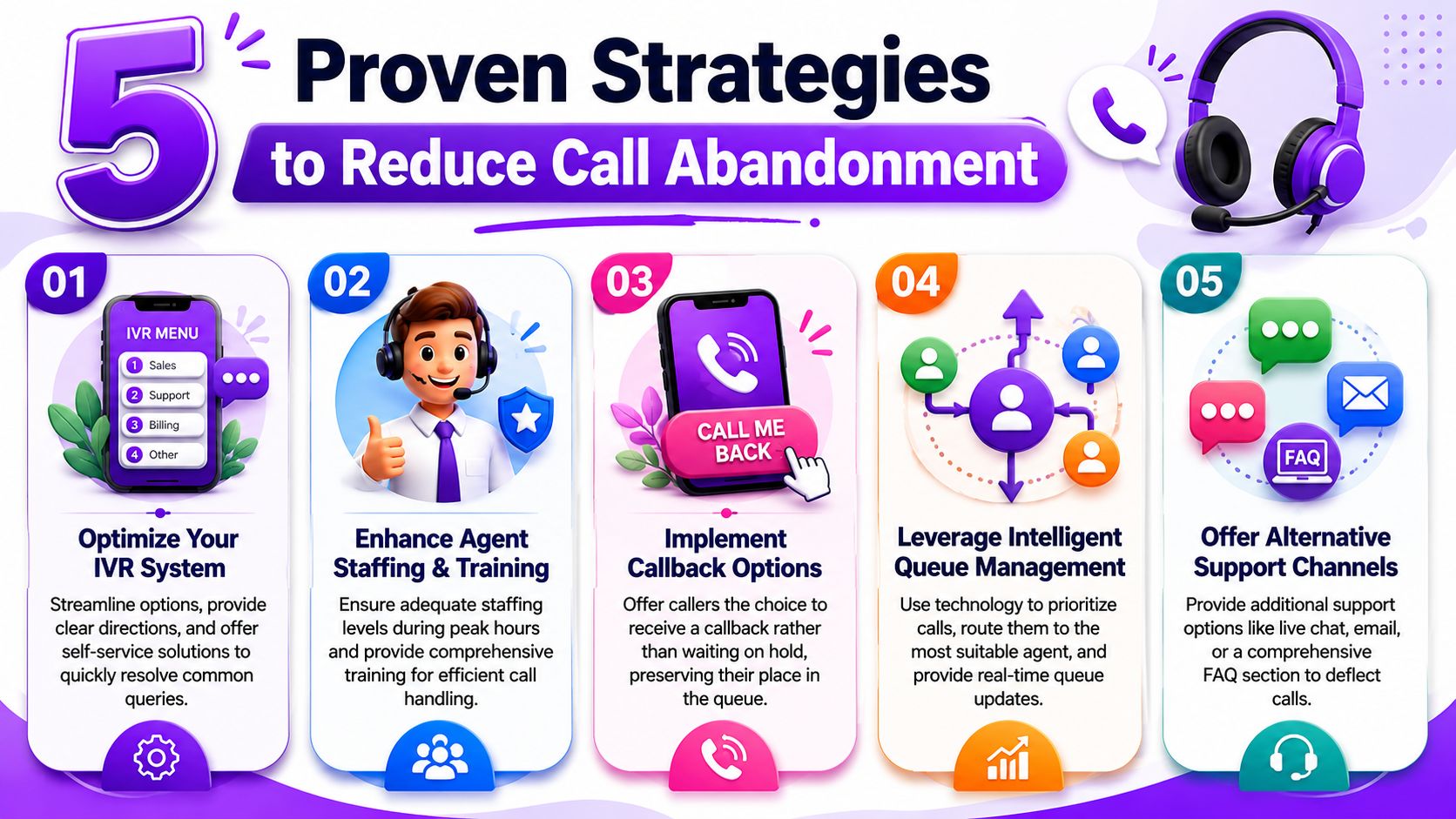
Pull call logs and look for pressure points. Not average volume. Actual spikes. If calls bunch up before opening, over lunch, right after jobs finish, or late in the day, staff for those windows specifically. Some businesses solve more abandonment by shifting schedules than by adding headcount.Simplify the IVR and routing path
If callers need a map to reach the right destination, the phone tree is too complex. Reduce menu choices, use plain language, and route high-intent calls quickly. If your business handles different service lines, intelligent call routing for small businesses can help separate urgent leads from lower-priority traffic without forcing everyone through the same line.Offer a real callback option
Many businesses force callers into a bad choice: wait indefinitely or hang up. A callback option changes the experience because the caller keeps their place without staying on hold. It also gives your team a cleaner recovery path and a concrete queue to work through.
Field note: The best callback workflows don’t just promise a return call. They assign ownership, time expectations, and a backup step such as SMS confirmation.
Industry advice on strategies to prevent call hang-ups often focuses on these fundamentals first, and that’s the right order. Businesses get into trouble when they buy tools before fixing scheduling, routing, and ownership.
Build a system that catches demand around the clock
Once the basics are in place, the next gains come from building coverage that doesn’t depend on one person being available.
Create after-hours and overflow coverage
Most small businesses don’t need a large in-house phone team. They need a dependable way to answer when staff are tied up, out on jobs, or closed. That can mean an answering service, a dedicated overflow workflow, or a trained hybrid setup where urgent calls route one way and routine calls route another.Use automation where it removes friction
AI, when configured carefully, can be useful. Rosie, for example, is an AI answering service that can handle calls 24/7, answer common questions based on your business information, capture detailed messages, book appointments, transfer priority calls, and filter spam. For a small business trying to reduce abandoned lead calls without adding another full-time hire, that kind of setup can cover the exact moments when abandonment usually happens: after hours, during peak bursts, and when the line is already busy.
The more advanced way to run this is by call type, not one blanket rule for everything. Voiso’s guidance emphasized that teams should track queue-specific abandonment rate, handle-time variance by call type, and CSAT delta on reconnected abandonments rather than a single blended KPI. That approach is what turns reduction efforts into something measurable. You can see whether your new-lead queue improved, whether billing traffic still waits too long, and whether recovered callers end up satisfied.
A practical rollout often looks like this:
First fix the bottleneck: Usually peak-hour coverage or bad routing.
Then protect the high-value queue: New leads, emergencies, appointment requests.
Then add recovery tools: Callbacks, SMS follow-up, voicemail-to-task workflows.
Then automate the repeatable parts: FAQs, booking, message capture, prioritization.
Owners who do this well don’t chase a vanity benchmark. They shorten the path between inbound intent and human help.
How to Measure and Report on Call Abandonment
Define what counts before you compare anything
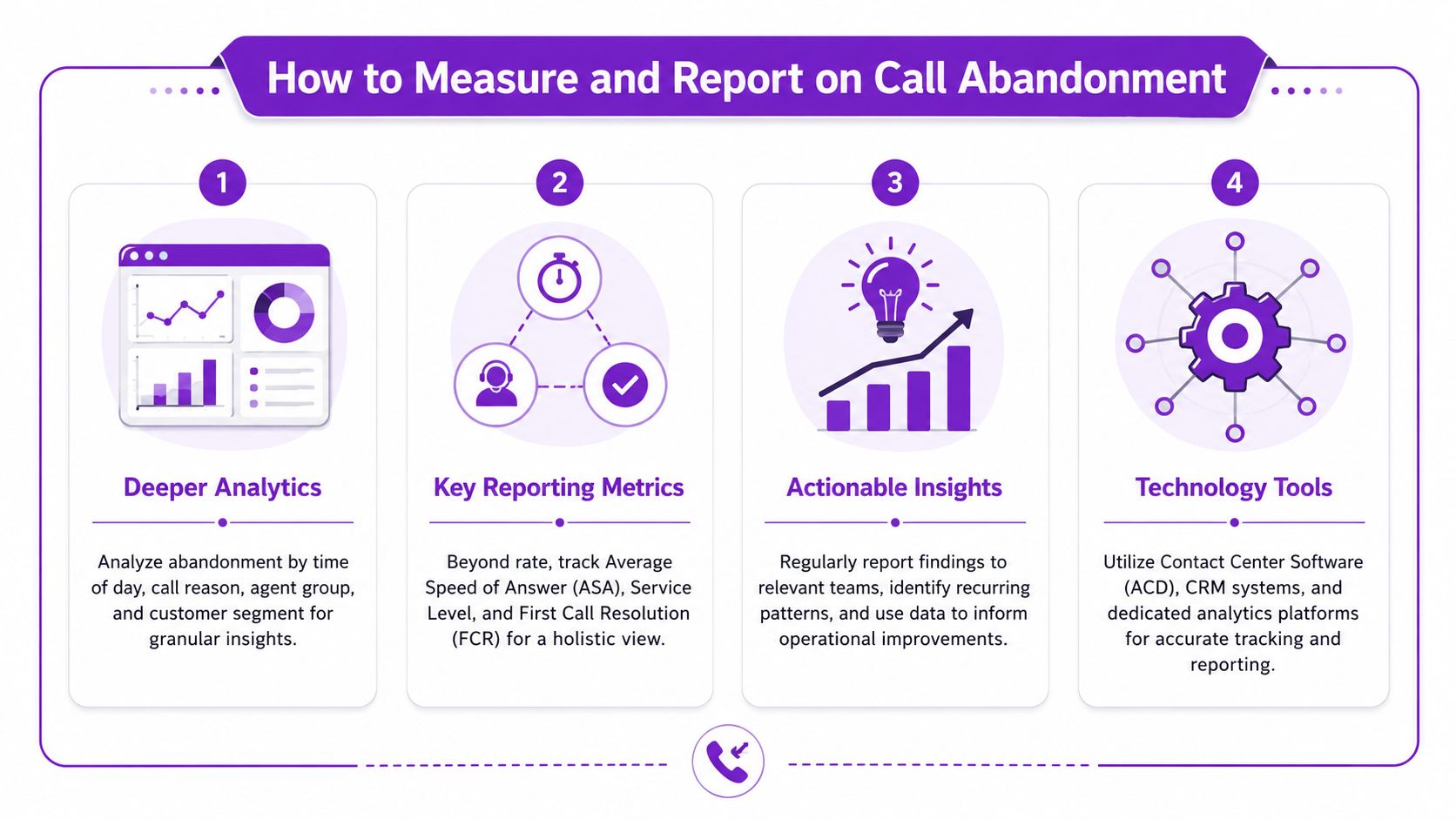
If you want useful reporting, start with rules. Most coverage defines abandonment as a caller hanging up before reaching an agent, but guidance from Solum’s glossary on call abandonment validity and recovery notes that the metric only becomes reliable when teams decide how to treat misdials, voicemail, and callbacks. That same guidance highlights that over half of abandoned callers never retry, and recommends tracking re-engagement conversion separately because raw abandonment can hide recoverable demand.
That means your first reporting question isn’t “What’s our rate?” It’s “What exactly are we counting?” If one manager includes voicemail disconnects and another excludes them, you won’t know whether performance changed or the reporting changed.
Use a written definition for:
True abandons: Caller disconnected before reaching live help.
Short abandons: Very brief disconnects that may not represent real intent.
Voicemail outcomes: Whether these count as abandons or a separate bucket.
Recovered abandons: Caller hung up first, but your team re-engaged and resolved or booked.
Non-actionable noise: Spam, robocalls, wrong numbers, accidental dials.
Use a recovery dashboard, not a single metric
The biggest mistake I see is reporting abandonment as a dead-end score. If the number goes up, everyone feels bad. If it goes down, everyone relaxes. Neither reaction tells you enough.
A better weekly dashboard ties the phone metric to action:
Metric | What to watch |
|---|---|
Abandonment rate by queue | Separate new leads, existing customers, admin, and after-hours traffic |
Callback requests | Shows how often callers choose recovery over waiting |
Re-engagement conversion | Measures how many abandoned callers you reconnect and turn into real outcomes |
Leads recovered | Counts the opportunities saved by your follow-up process |
Follow-up lag | Reveals whether your callback workflow is fast enough to matter |
If you only track abandonment, you measure frustration. If you also track recovery, you measure management.
Keep the report simple enough that someone reviews it every week. Add time-of-day patterns, call reason, and destination queue if your system supports it. Then set alerts for unusual spikes so your team investigates while the issue is still fresh.
This turns call abandonment from a vague service problem into an operating rhythm. You spot the hours that need coverage. You see which queues need a lower target. You find out whether your callbacks rescue revenue or just create a longer to-do list.
If your business is losing leads because calls go unanswered, get dropped, or wait too long for a response, Rosie can give you a practical safety net. It answers calls around the clock, handles common questions, captures lead details, books appointments, and routes priority conversations so fewer callers give up before reaching help.