If you run a service business, you already know the phone problem. Calls come in when you’re on a ladder, under a sink, with a client, driving between jobs, or just trying to finish the work in front of you. You can answer everything yourself and let the day get chopped into pieces. Or you can let calls roll to voicemail and hope people leave a message.
Most don’t.
That’s why small business owners are skeptical when someone pitches an AI phone answering tool. The first question isn’t “Is it smart?” It’s “Will it understand my customers?” For a long time, that was the right question to ask. Old automated systems were clunky, brittle, and embarrassing. They misheard simple requests, stumbled on accents, and forced callers into menu trees that felt designed by someone who had never answered a real business phone.
That objection still drives this market. And it should. Voice recognition accuracy is the whole game. If the system gets the call wrong, none of the automation matters.
Table of Contents
The Small Business Owner’s Dilemma with Answering Phones

A lot of owners live in the same loop. The phone rings while they’re working. They either stop what they’re doing to answer, or they let it go and tell themselves they’ll call back later. Then later gets crowded out by estimates, payroll, supplies, one more job, one more fire to put out.
The problem isn’t just missed calls. It’s fragmented attention. A plumber can’t troubleshoot well while juggling inbound calls. A salon owner can’t give a client a good experience while half-watching the front desk phone. A law office can’t sound organized if new inquiries keep landing in voicemail.
The two bad options owners know too well
For years, the choice looked ugly:
Answer everything yourself: You stay responsive, but your day gets hijacked.
Use voicemail: You protect your time, but callers drift away.
Try an old automated system: You risk sounding cheap or careless when the machine gets basic things wrong.
That last option is what poisoned the well for a lot of people. Owners don’t hate automation in theory. They hate putting customers through a bad interaction.
Practical rule: If your phone system creates friction at the first point of contact, customers assume the rest of your operation will feel the same way.
What matters in the world is simple. Can the system understand natural speech well enough to answer common questions, capture details correctly, and keep the conversation moving without making your business sound robotic?
If the answer is yes, the phone stops being a daily interruption and starts working like a front desk. If the answer is no, you’re better off with a missed call than a bad call.
Why Old Phone Robots Failed Your Customers
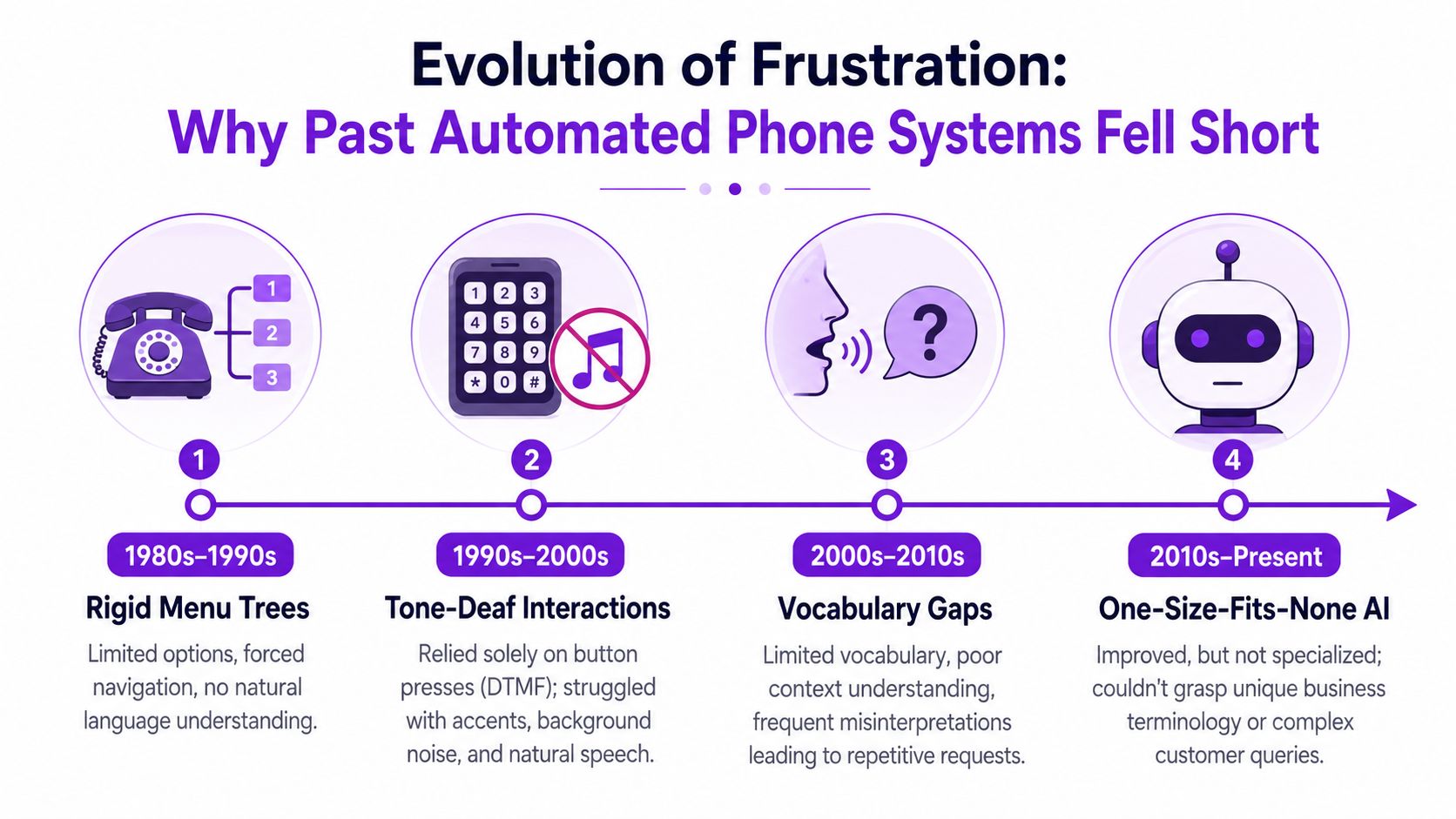
A customer calls during lunch rush, school pickup, or the last job of the day. They explain the problem in a normal sentence, with a little background noise and a little urgency. The old phone robot misses half of it, forces them into a menu, or sends them to the wrong place. Small business owners remember those systems for a reason. They trained customers to expect friction.
The limitation was real. Early speech systems started with very narrow recognition tasks. Bell Labs’ Audrey recognized spoken digits in the 1950s, and DARPA’s later speech programs pushed toward much larger vocabularies as researchers tried to move beyond one-word commands into broader language handling (historical review of speech recognition milestones).
They were built for scripts
Older phone automation worked only if the caller followed the script. The system expected short, approved answers, clear audio, and one intent at a time. That worked for “billing” or “operator.” It broke down fast when someone said, “My AC stopped working last night and I need someone out today,” or “I need to reschedule, and I also have a question about the estimate.”
That is why early phone trees felt so clumsy. Many IVR phone systems were designed around rigid menu paths, not natural conversation. Customers had to adapt to the machine instead of the machine adapting to the customer.
Small businesses paid the price. Every misunderstood request made the business sound harder to reach than it really was.
Recognition was only part of the problem
Raw speech recognition used to struggle with conversational language, especially over phone lines. Background noise, crosstalk, accents, and rushed speech all lowered accuracy. Even when the system captured the words correctly, it often had no idea what those words meant in a business setting.
That second failure mattered just as much.
A generic system might hear “root touch-up,” “spring tune-up,” “tenant screening,” or “panel upgrade” and still fail to route the call correctly because it lacks context for how that phrase is used in your business. Owners felt that gap long before vendors started talking about AI. They saw it in angry callers, bad handoffs, and appointments that never got booked.
This is why many owners became skeptical of AI phone systems in the first place. The old tools did not fail in theory. They failed on real calls, with real customers, at the exact moment trust mattered most.
Rosie addresses the problem differently. Instead of relying on generic language handling alone, it can be trained around your services, your vocabulary, and the kinds of requests your customers make. That business-specific training is what separates a system that merely hears speech from one that can handle a front-desk conversation.
The Key Factors That Affect Voice Recognition Accuracy

When people ask about voice recognition accuracy, they usually mean one practical thing: Will the system understand my callers the first time?
That depends on more than one variable. Good systems don’t just rely on raw speech recognition. They combine clean audio input, strong language models, and smart handling when the system isn’t fully sure.
What accuracy means in plain language
The standard metric is Word Error Rate, often shortened to WER. You don’t need to live in the metric. You just need to know what it tells you. Lower WER means fewer transcription mistakes.
But average WER can hide important problems. Research on racial and accent disparities found an average WER of 0.35 for Black speakers versus much lower error for White speakers, and the same review notes that some underrepresented groups still see large gaps even in strong modern systems (accent accessibility analysis summarizing disparity research).
If your customers come from different neighborhoods, age groups, language backgrounds, or regions, that matters more than a glossy average accuracy claim.
The real-world factors that change results
A phone system can perform well in one setting and poorly in another. These are the factors that usually make the difference:
Background noise: Road noise, shop noise, kids in the car, wind, restaurant chatter.
Caller speaking style: Fast talkers, people who trail off, people who stack three questions together.
Accent and dialect: Not a corner case. A daily reality for many businesses.
Industry language: Service names, neighborhood names, local landmarks, product brands, and abbreviations.
Call quality: Cell signal, compression, speakerphone, old handsets.
A roofing company gets callers from job sites. A salon gets callers in traffic. A property manager gets tenants calling from noisy hallways. Different businesses hear different audio conditions all day.
Factor | What it affects | What good systems do |
|---|---|---|
Audio quality | Whether speech is captured clearly | Separate speech from noise as well as possible |
Vocabulary | Whether key terms are recognized | Account for business-specific words and phrases |
Context | Whether the system understands intent | Use surrounding words to infer meaning |
Uncertainty handling | Whether mistakes snowball | Surface low-confidence moments instead of bluffing |
Why uncertainty handling matters
One undercovered issue is what the system does when it’s unsure. A recent study found that selectively slowing text-to-speech playback only when the ASR model was uncertain improved participants’ error-detection accuracy to 85.3% versus 80% for normal playback, with only a 7% increase in review time (study on confidence-aware review workflows).
That matters because real business workflows aren’t just “transcribe perfectly or fail.” They’re about catching mistakes quickly and knowing when to review.
A trustworthy system doesn’t pretend to be certain all the time. It gives you a clean way to recover when a caller says something unusual or unclear.
For small businesses, that usually means one of two things. Either the system confidently handles the routine call, or it captures the message clearly enough that you can step in without losing context.
How Modern AI Finally Achieved Human-Level Understanding
The big change wasn’t that computers started hearing louder. They started modeling language better.
Modern AI voice recognition systems rely on deep neural networks and large training datasets. In plain English, that means they’ve learned from far more examples of real human speech than the old rule-based systems ever could. They don’t just match sounds to fixed commands. They use context to predict what a person most likely said in a flowing sentence.
The public turning point
The moment many businesses could point to came in 2016 to 2017. On the Switchboard conversational benchmark, Microsoft reported a 5.9% word error rate, described as human parity because it matched professional transcribers. Summaries from the same period also report IBM at 6.9% in 2016, then 5.5%, and Google at 4.9% shortly after, which showed how fast the major systems were converging toward human-level transcription on conversational English (history of commercial voice recognition benchmarks).
That milestone mattered because it moved voice AI out of the novelty category. It became accurate enough for mainstream transcription, phone routing, and conversational interfaces in large English-speaking markets.
What changed in practice
Old systems often treated speech like isolated tokens. Newer systems handle:
Continuous speech: People can talk naturally instead of pausing between keywords.
Context: The model can use surrounding words to resolve ambiguity.
Messy phrasing: Fillers, restarts, partial sentences, and conversational detours.
Real-time interaction: Systems can respond fast enough to keep a call feeling natural.
If you follow developments in AI and automation for customer communication, this is the category shift that made AI phone answering commercially realistic.
The practical takeaway is straightforward. The old objection, “machines can’t understand real conversations,” used to be true. It isn’t automatically true anymore.
That doesn’t mean every tool performs equally well. It means the baseline technology finally crossed the threshold where the conversation is worth having.
Rosie’s Advantage Business-Specific AI Training
General speech recognition is only half the job. A business phone assistant also has to know what your callers are talking about.
That’s where a generic AI receptionist often breaks down. It may catch the words, but still miss the business meaning. A caller asks whether you service a certain neighborhood, whether estimates are free, whether you take walk-ins, or whether a repair can be done the same day. The speech recognition layer might be fine. The business answer still goes wrong.
What business-specific training changes
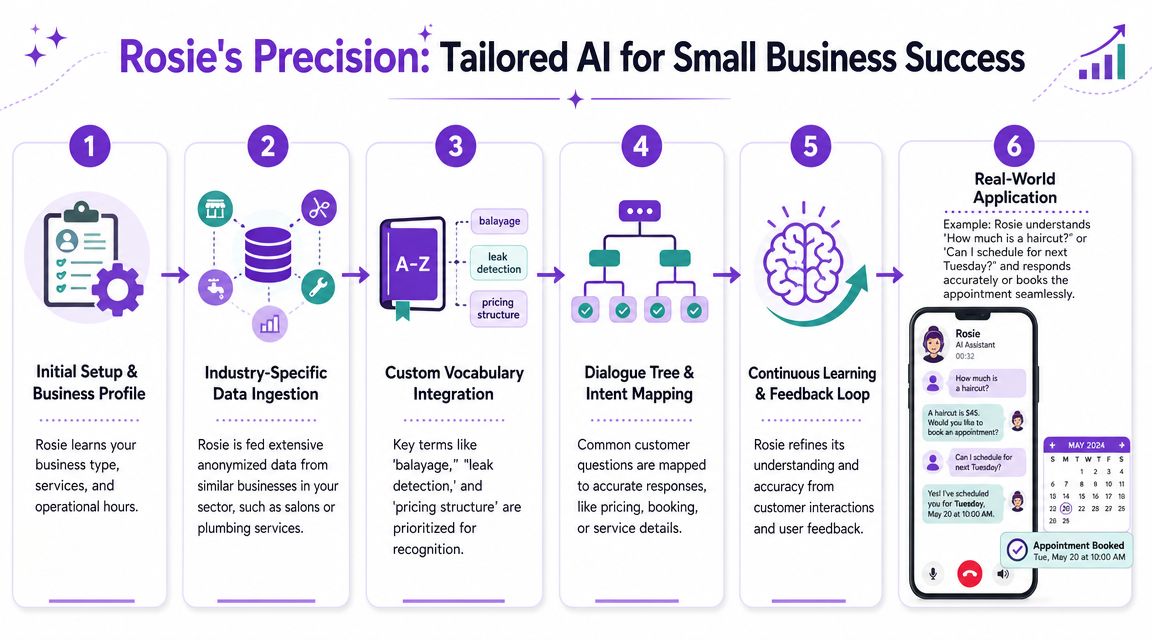
Rosie is trained on your website or Google Business Profile, then refined with custom FAQs and message scenarios. That setup gives the system your services, hours, policies, and the language customers use when they call your business. On higher tiers, you can go deeper with added training material and workflow options, which is the practical difference between a generic voice bot and a front desk system tuned to your operation. The company also describes platform improvements in updates like Rosie now powered by Bland 2.0.
That matters because small business calls are full of local and industry-specific language. “Do you handle mini-splits?” “Can I book a balayage?” “Do you service the west side?” “Can you send someone for a panel issue?” Those aren’t edge cases. They’re normal calls.
An illustrative call flow
Take an HVAC owner on a job site.
A new caller says, “My AC stopped cooling last night. I’m in your service area. Do you charge for estimates, and can someone come this week?” A generic system might hear the words but fumble the handoff between service area, pricing policy, and scheduling intent.
A business-trained system can:
Recognize the service request and connect it to your actual offerings.
Answer the pricing or estimate question based on the information you provided.
Capture the callback details without forcing the caller into voicemail.
Send the owner a usable summary so the next step is obvious.
That’s what owners need from AI phone answering. Not a clever demo. A system that handles routine demand without creating cleanup work.
Where accuracy really shows up
The most expensive phone mistakes are often small ones. A wrong name. A misspelled street. A bad callback number.
Ford Wright of Pacific Power Washers put that plainly in a customer testimonial: “We have tried other AI receptionists, but they sounded robotic and worse, misspelled contact info, making it worthless.”
That’s a useful standard. If a system can’t capture the details needed for follow-up, it hasn’t solved the phone problem.
Here’s the practical comparison:
Feature | Generic AI | Rosie (Business-Specific AI) |
|---|---|---|
Understands general speech | Yes, to a degree | Yes |
Knows your services and hours | Usually limited | Yes, from business data and setup |
Handles custom FAQs | Often basic | Yes |
Captures messages for follow-up | Yes | Yes |
Books appointments or sends links | Varies | Available on supported plans |
Uses your business context in answers | Limited | Yes |
One more testimonial gets at the trust issue from a different angle. A Crunch Fitness Franchisee said, “Rosie is the real deal. We’ve tried all the others and Rosie is the only one that is easy to set up and sounds so realistic.”
That doesn’t replace testing. But it does match what many owners are trying to verify: can this system sound natural enough, and understand enough, that customers stay on the line instead of bailing out?
How to Verify AI Accuracy for Your Business
You shouldn’t take any provider’s accuracy claims at face value. Test the system the way your business gets calls.
The right question isn’t “Is this AI good?” It’s “Does it handle my callers, my services, and my routine phone traffic without creating extra work?”
What to test on live or trial calls
Run a short set of real scenarios:
Use normal speech
Don’t speak like you’re talking to a machine. Ask a full question the way a customer would.Try a multipart request
Ask two or three things at once. For example, service area, availability, and price.Call from a noisy place
Use a car, speakerphone, shop floor, or sidewalk. That’s how many real callers sound.Use your business terminology
Mention your service names, neighborhood names, common job types, or policy questions.Check the follow-up details
Review the captured name, phone number, summary, and any next-step message.
What good performance looks like
You’re looking for a few practical signs:
It answers directly instead of dodging into vague scripts.
It keeps the conversation moving without repeated “sorry, can you repeat that?”
It knows when to fall back and take a clean message if the request is unusual.
It gives you usable context after the call, not a garbled transcript you have to decode.
If a tool only works when the caller speaks slowly in a quiet room, it doesn’t work for a real small business.
The fallback path matters as much as the first answer. When a caller asks something the system doesn’t know, the handoff should still be smooth. The useful outcome is a clear message, an immediate notification, and enough context for a confident callback.
A trial is the right way to judge this. Don’t treat it like a software demo. Treat it like a front-desk audition with your own call patterns, your own questions, and the kinds of callers you serve.
If you’re tired of losing leads to voicemail, Rosie gives you a practical way to test whether AI phone answering is finally accurate enough for your business. It answers calls around the clock, uses your business information to respond to common questions, captures messages, and can support booking or transfers depending on setup. Start the 7-day free trial and judge it the only way that matters: by how it handles your real calls.