You’re on a job, under a car, on a ladder, or walking a property when the phone buzzes again. A customer booked yesterday, your front desk meant to confirm this morning, and now the appointment time is close enough to be risky. If nobody follows up, you might eat an empty slot. If somebody does follow up, they lose time chasing replies, checking calendars, and cleaning up avoidable confusion.
That’s the problem with appointment confirmation text messages. They’re simple on the surface, but the difference between a basic text and a solid workflow shows up fast in your schedule and your cash flow.
The fix is straightforward. Send the right text, at the right time, with a reply path that is functional.
You’ll learn:
How no-shows hit revenue, labor, and scheduling harder than most owners realize
What to put in an appointment confirmation text message so people reply instead of ghosting
How to build a two-way confirmation system that cuts admin work instead of adding to it
If your phones, leads, and scheduling all feel tied together, it’s worth taking a look at Rosie, especially if you need calls answered, questions handled, and appointments booked without pulling your team off real work.
Table of Contents
The real cost of a no-show is more than just lost time
The obvious loss is the empty slot.
The bigger problem is everything wrapped around it. A tech blocked time. A room sat ready. Somebody else could’ve taken that appointment. Your team still had to prep, wait, notice the miss, and then decide whether to chase the customer or move on.
A missed appointment creates a chain reaction
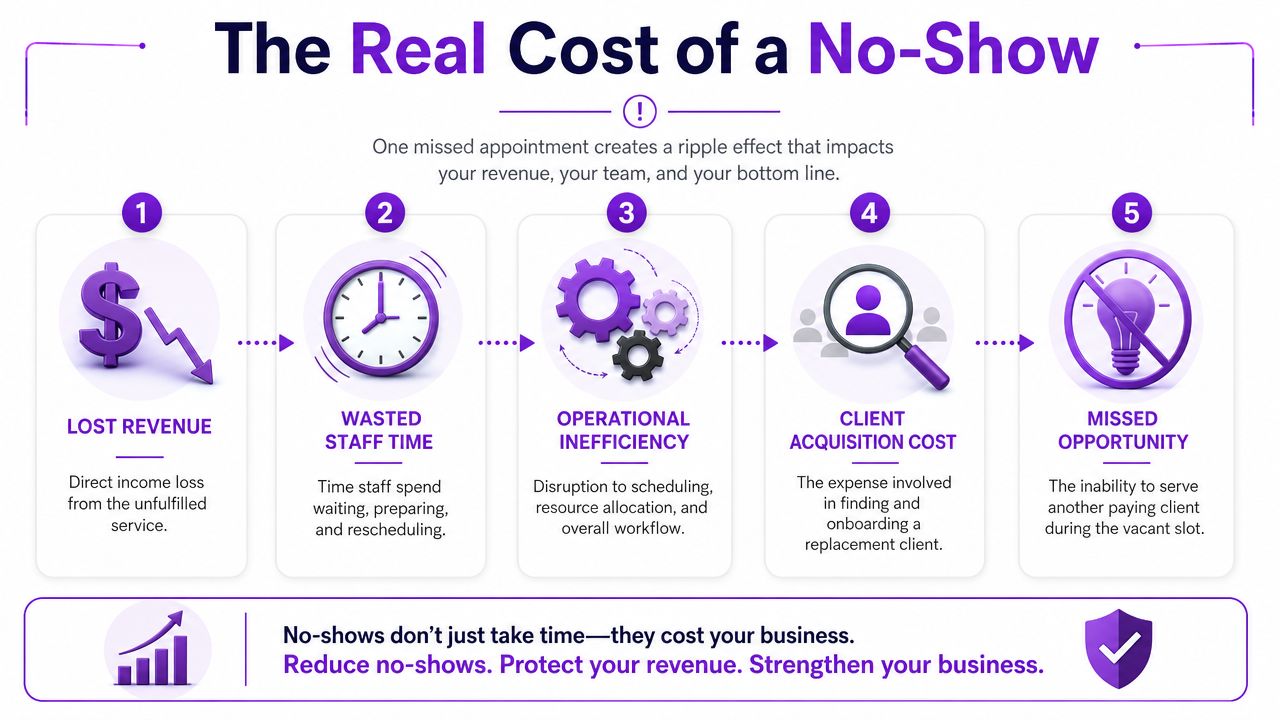
When owners talk about no-shows, they usually talk about frustration first. That makes sense. But the main issue is operational drag.
One missed appointment can create all of this:
Lost revenue: The clearest hit. The time was reserved and never monetized.
Wasted labor: Staff prepared, waited, or followed up when they could’ve handled active work.
Schedule damage: Empty gaps break routing, staffing flow, and daily pacing.
Acquisition waste: You already paid in time or marketing effort to win that booking.
Opportunity cost: Another customer could’ve filled that slot.
Practical rule: If a customer can book in under a minute, they should be able to confirm or reschedule in under a minute too.
Healthcare data is useful here because the scheduling pain is so visible. A systematic review summarized by Dialog Health found that 97% of studies (28 of 29) showed patient reminders improved attendance, with a weighted mean relative reduction in non-attendance of 34%. The same review reported automated reminders cost about €0.14 per contacted patient compared with €0.90 for manual telephone reminders, which is why texting tends to beat call-heavy workflows on economics as volume rises (Dialog Health reminder statistics).
Even if you don’t run a clinic, the math feels familiar. Empty chair, empty bay, empty service window, empty consultation block. Same problem.
The cheap fix is usually the right one
A lot of owners try to solve no-shows with more hustle. More outbound calls. More sticky notes. More “did we confirm that one?” conversations.
That’s not a system. That’s a strain injury.
If you manage crews, routes, or field appointments, the scheduling side of this connects directly to driving sales execution. The point isn’t just to remind people. It’s to protect capacity you’ve already sold.
Here’s what works better in practice:
Send confirmation right after booking: Catch bad dates, bad times, and second thoughts early.
Make replying dead simple: “Reply C to confirm” beats long instructions.
Give people a way out: A reschedule path is better than silence.
Stop relying on memory: If a process lives in one employee’s head, it breaks.
No-shows aren’t just annoying. They’re a preventable margin leak.
Why your manual confirmation process is holding you back
A lot of businesses know they should confirm appointments. The problem is how they’re doing it.
They’re calling from the office line between tasks. They’re texting from a personal phone. They’re sending calendar invites nobody opens. Then they wonder why the schedule still has holes.
Manual follow-up sounds responsible until you do it every day

Manual confirmation has three recurring problems.
First, it depends on somebody remembering to do it.
Second, it often happens late, when the customer has already mentally moved on.
Third, even when your team does everything right, replies come back in messy ways. “Can we push?” “Running late.” “Is this with Mike?” Now somebody has to translate that into action.
“It’s almost every day that I lost a job due to not answering the phone. Rosie can take all of those calls and handle them appropriately.”
Jason Aleman, Gutter Cowboy
That quote is about calls, but the same thing happens with scheduling admin. The work isn’t hard. It’s relentless.
Email gets buried and phone calls create bottlenecks
This is why text has become the first move for many businesses. One industry source reports average text-message open rates of 98%, with 97% of messages opened within 15 minutes. That same source contrasts SMS with email open rates of only 18%–20%, which tells you why email often fails as a fast confirmation channel (Weave on appointment reminder texting).
A quick comparison makes the problem obvious:
Method | What usually happens |
|---|---|
Phone call | Staff plays phone tag and leaves voicemails |
Customer misses it until it’s too late | |
Personal texting | Replies get scattered across devices and employees |
Automated SMS | Customer sees it fast and can act quickly |
The bad process isn’t failing because your team doesn’t care.
It’s failing because it asks busy people to do repetitive work in the middle of everything else.
The anatomy of a perfect appointment confirmation text
A good appointment confirmation text message isn’t clever. It’s clear.
Your customer should know who it’s from, what they booked, when it happens, and what to do next. If they have to reread it, you’re already adding friction.
What every message needs
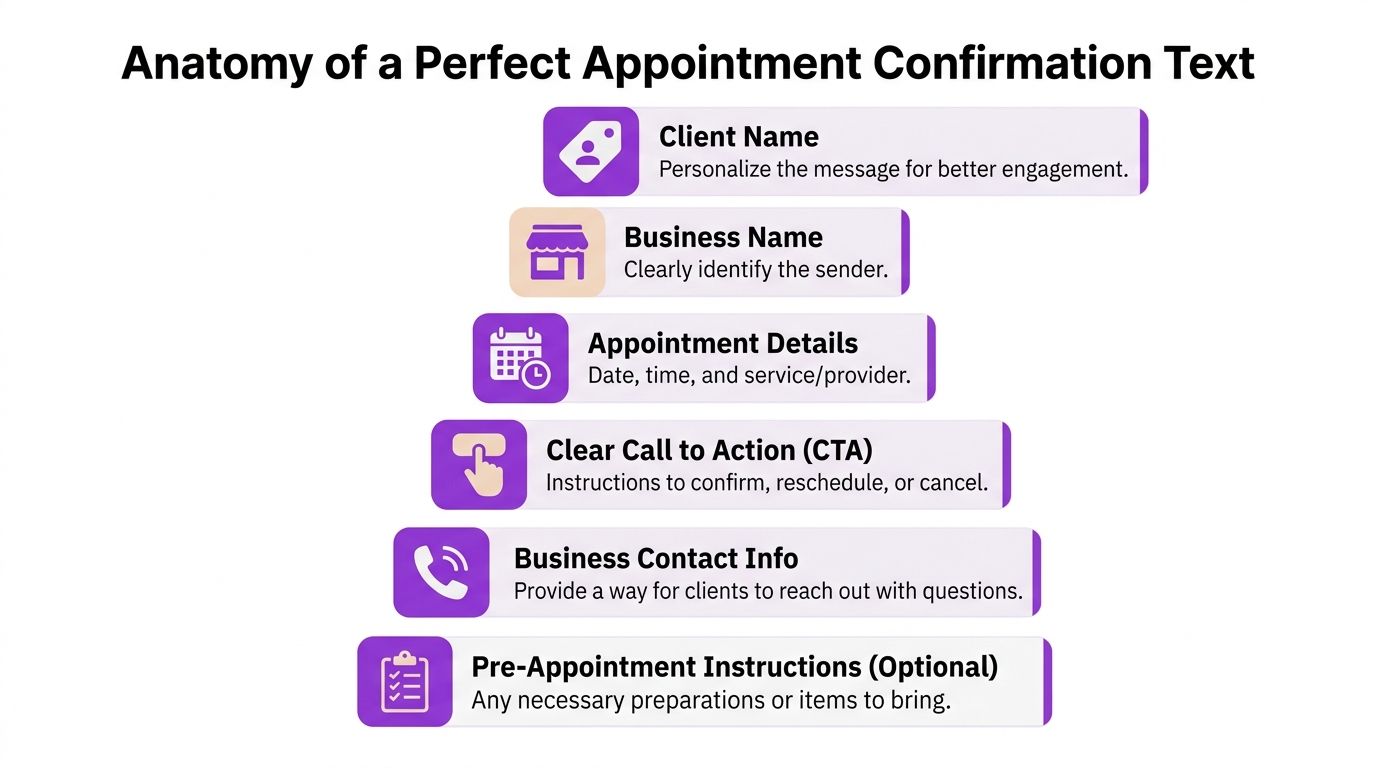
Use this checklist when writing any confirmation text:
Client name: Personal enough to feel real.
Business name: So the customer instantly knows who’s texting.
Appointment details: Date, time, and the minimum useful detail.
Clear CTA: Confirm, reschedule, or cancel.
Contact path: A number, link, or reply instruction.
Prep details if needed: Only if they matter to showing up ready.
A strong message looks more like this:
Hi Sarah, this is Northside Plumbing. You’re booked for Tuesday at 2:00 PM. Reply CONFIRM to keep this appointment or RESCHEDULE if you need a different time.
Short. Direct. Hard to misunderstand.
If you want texting to connect with your site inquiries too, website texting can help move prospects from browsing to booked without making them call first.
How to write privacy-safe texts for sensitive services
A lot of generic advice falls apart here.
A major content gap in public guidance is privacy-safe appointment confirmation text messaging for sensitive services. Many articles focus on including the client name, business name, date, time, location, and a CTA, but don’t really address what happens when the appointment itself reveals something private, such as a legal, medical, fertility, mental health, or addiction-related service (Weave on confirmation text examples).
If you’re in one of those industries, naming the service can be the mistake.
Phones get shared. Lock screens light up. Family members glance down.
Use a safer pattern:
Risky version | Safer version |
|---|---|
“Your divorce consult is confirmed for Thursday” | “Your appointment is confirmed for Thursday” |
“Reminder for your fertility visit” | “Reminder about your scheduled visit” |
“Your addiction counseling session is at 4” | “You’re scheduled for 4:00 PM today” |
“It can’t be easy to develop a product that is both super-configurable yet also easy to use, Rosie strikes this balance extremely well. My clients are happy and I’m happy, it’s a win/win.”
Daniel Terner, Terner Elder Law, P.L.
For sensitive businesses, the safest text is often the least descriptive one that still gets the job done.
How to build a smart confirmation workflow
One text is not a workflow.
A workflow is what happens after the booking, after the first reminder, after the customer replies unclearly, and after business hours when nobody’s at the desk.
Start with the booking, not the reminder
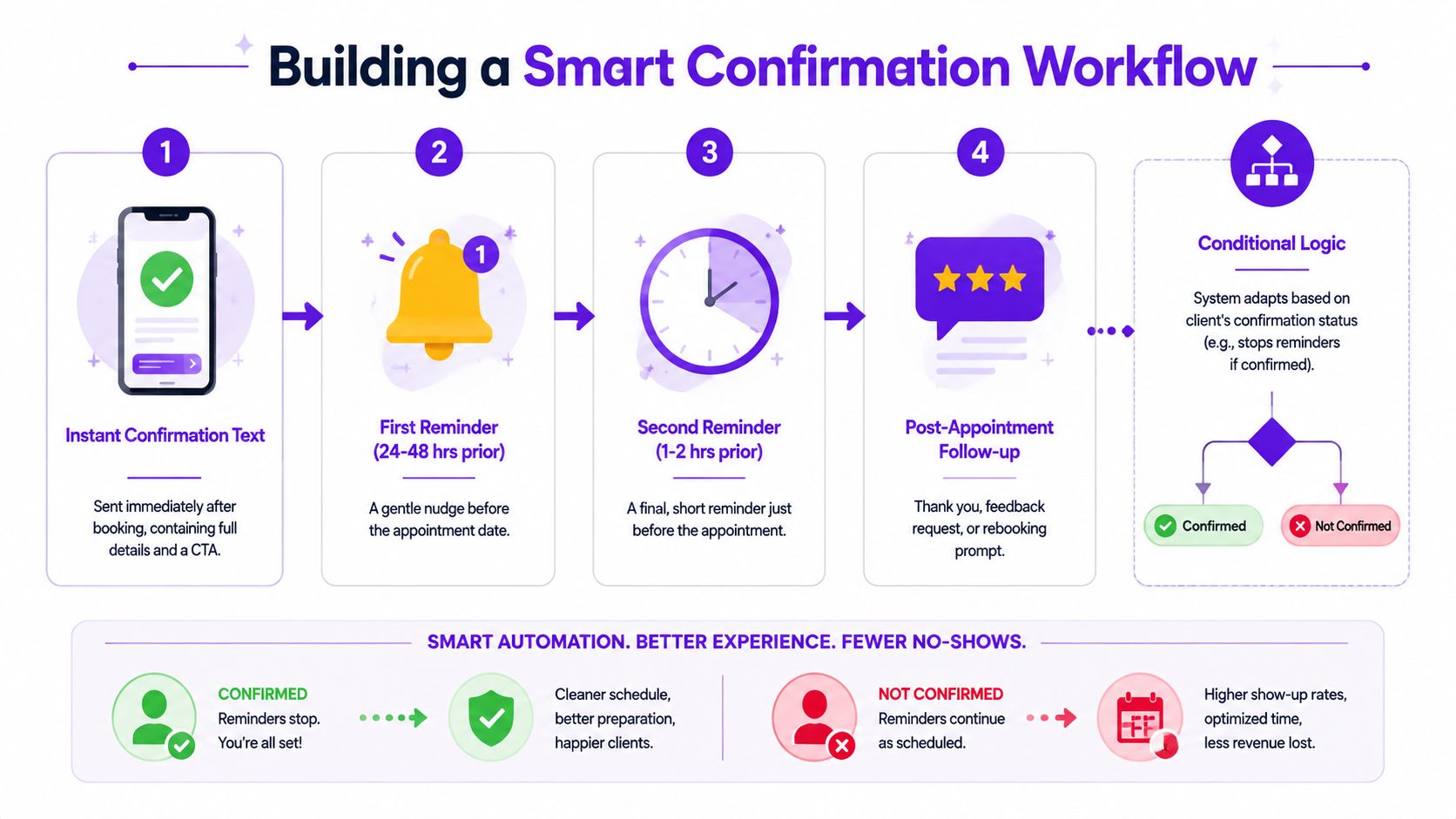
The cleanest setup usually follows this sequence:
Immediate confirmation Sent right after booking. This allows customers to catch wrong dates and time mistakes early.
Reminder before the appointment A nudge close enough to matter, but early enough to free the slot if they can’t make it.
Short day-of reminder Useful for jobs, visits, consults, and appointments people may forget once the day gets busy.
Follow-up after the appointment Thank-you, rebooking link, next-step instructions, or review request.
That structure matters because public advice often stops at “send a text reminder.” What’s missing is what happens when the customer replies. As noted by TrueDialog, the gap is practical handling of ambiguous responses, reschedule requests, and after-hours replies. The trend is moving from one-way reminders to structured, automated back-and-forth workflows (TrueDialog on appointment confirmation workflows).
Plan for messy replies
Customers don’t reply like software.
They say things like:
“Yep”
“Can we do Friday?”
“I’m stuck at work”
“Call me”
Your process has to classify those replies and do something useful with them.
A simple decision model works:
Reply type | What your system should do |
|---|---|
Clear yes | Mark confirmed and stop extra reminder nudges |
Reschedule request | Route to booking options or staff follow-up |
Question | Answer if possible, escalate if not |
Unclear response | Ask one clarifying question |
No response | Send one follow-up, then flag the appointment |
If your team still has to read every reply manually, you didn’t automate the hard part.
Use tools that turn replies into action
Forms, calendars, and phone coverage begin to collaborate effectively.
For example, if you’re collecting bookings or intake details online, Twilio form automation can help pass form-triggered messages into a text workflow so confirmations go out without someone copying data between systems.
If you want appointment replies and call handling tied closer to your schedule, booking directly into your calendar is the kind of setup that cuts the back-and-forth. Rosie can answer calls, qualify leads, send texts, book appointments, and transfer urgent calls using your business info after it scans your website or Google Business Profile.
The true goal isn’t automation for its own sake.
It’s fewer empty slots, fewer callback chains, and less admin work sitting on top of every booking.
Appointment confirmation templates you can use today
Good templates make your business easier to buy from.
Jason Aleman from Gutter Cowboy put it plainly: “People tell me all the time, you’re really easy to do business with. I called, I got the link sent to me, the pricing was there, I booked an appointment and you showed up to the job.”
That’s what a strong appointment confirmation text message should support. Less friction. Fewer surprises.
Home services template
For plumbers, HVAC companies, electricians, cleaners, and similar businesses, clarity matters more than polish.
Template
Hi [First Name], this is [Business Name]. Your appointment is scheduled for [Day] at [Time]. Reply CONFIRM to keep it. If you need a different time, reply RESCHEDULE and we’ll send options.
Why it works
It names the business fast
It gives one clear action
It creates a path other than no-showing
Salon or spa template
This kind of appointment usually needs a softer tone, but it still needs boundaries.
Template
Hi [First Name], you’re booked with [Business Name] for [Day] at [Time]. Reply YES to confirm. If you need to make a change, reply CHANGE as soon as you can.
Add your cancellation policy elsewhere in the booking flow or in a follow-up if needed. Don’t cram everything into the first text.
Law office template
Legal clients often need reassurance and privacy, not extra detail on a lock screen.
Template
Hello [First Name], this is [Firm Name]. Your appointment is scheduled for [Day] at [Time]. Reply CONFIRM to keep this appointment or REPLY CALL if you need assistance before then.
Notice what’s missing. No case type. No matter description. No overexposure.
Owner’s shortcut: If the service category would feel awkward on a lock screen, leave it out of the text.
Property management or real estate template
These appointments often involve access, tenants, or multiple moving parts.
Template
Hi [First Name], this is [Business Name]. Confirming your appointment for [Day] at [Time]. Reply YES to confirm or TEXT NEW TIME if you need to reschedule.
If the customer needs prep instructions, send those in a second message only when necessary. Combining logistics, disclosures, and confirmation in one long text usually hurts response quality.
Ready to put your appointments on autopilot
No-shows cost more than the empty slot. Manual confirmations cost more than the time it takes to send them.
A better setup handles both sides of the problem. It confirms the appointment quickly, gives the customer an easy way to reply, and routes that reply somewhere useful instead of dumping more work on your team.
If you’re comparing tools, it helps to review appointment scheduling apps for small businesses with one question in mind. Do they just send reminders, or do they help you book, confirm, answer questions, and keep the calendar clean?
If your current process still depends on missed calls, personal phones, and manual follow-up, it’s probably time to tighten it up.
Frequently asked questions
When should I send an appointment confirmation text message
Send the first confirmation right after the booking is made. That’s when the customer is most likely to catch a wrong date, wrong time, or simple typo before it becomes a problem.
After that, use a reminder cadence that fits the appointment type. Higher-commitment appointments usually deserve at least one reminder before the visit, and many businesses also benefit from a short day-of text.
What should happen when someone replies with something other than YES
Assume replies will be messy and plan for that upfront. Some people will confirm clearly. Others will ask a question, suggest a new time, or send a vague response that needs clarification.
The practical move is to sort replies into a few buckets: confirmed, reschedule, question, unclear, and no response. Once you do that, you can decide what should be automated and what should go to a person.
Should I send confirmations from a personal cell phone
That usually works at very low volume, then becomes a mess.
Replies end up tied to one employee, message history gets scattered, and customers may text outside business hours expecting a response. It also creates avoidable privacy and documentation problems. A business texting setup keeps communication consistent and visible to the team.
How much detail should I include in the text
Include only what the customer needs to recognize the appointment and take the next step. Business name, date, time, and a clear reply option are usually enough.
If you work in a sensitive field, less detail is often safer. Don’t include service names or private context unless there’s a real operational reason to do it.
If you want fewer missed calls, cleaner scheduling, and a better way to handle appointment confirmations without piling more admin work onto your team, take a look at Rosie. She answers calls, qualifies leads, books appointments, transfers urgent callers, and helps keep your front end responsive even when everyone’s busy.